Forum Discussion

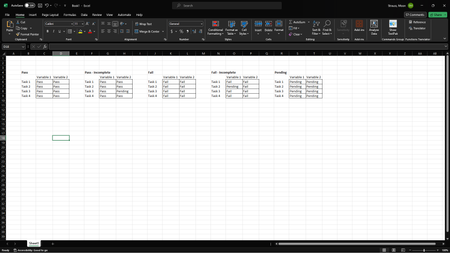
Looking for a way for the IFS function to return a specific value based on several factors.

=LET(rng,C6:D9,
IFS(
AND(COUNTIF(rng,"Pass"),COUNTIF(rng,"<>Pass")=0),
"Pass",
AND(COUNTIF(rng,"Pass")>0,COUNTIF(rng,"Pending")>0,COUNTIFS(rng,"<>Pass",rng,"<>Pending")=0),
"Pass - Incomplete",
AND(COUNTIF(rng,"Fail")>0,COUNTIF(rng,"Pass")>0,COUNTIFS(rng,"<>Fail",rng,"<>Pass")=0),
"Fail",
AND(COUNTIF(rng,"Fail")>0,COUNTIF(rng,"Pending")>0,COUNTIFS(rng,"<>Fail",rng,"<>Pending")=0),
"Fail - Incomplete",
AND(COUNTIF(rng,"Pending"),COUNTIF(rng,"<>Pending")=0),
"Pending",
TRUE,"no such")
)
This formula should return the intended result according to your screenshot with the exception that if any values are "Fail" and the remaining are "Pass" then the formula returns "Fail". According to the screenshot "Fail" should be returned only if all values are "Fail". If you don't have access to the LET function then IFS can be used however it's inconvenient to change the ranges.
=IFS(
AND(COUNTIF(C6:D9,"Pass"),COUNTIF(C6:D9,"<>Pass")=0),
"Pass",
AND(COUNTIF(C6:D9,"Pass")>0,COUNTIF(C6:D9,"Pending")>0,COUNTIFS(C6:D9,"<>Pass",C6:D9,"<>Pending")=0),
"Pass - Incomplete",
AND(COUNTIF(C6:D9,"Fail")>0,COUNTIF(C6:D9,"Pass")>0,COUNTIFS(C6:D9,"<>Fail",C6:D9,"<>Pass")=0),
"Fail",
AND(COUNTIF(C6:D9,"Fail")>0,COUNTIF(C6:D9,"Pending")>0,COUNTIFS(C6:D9,"<>Fail",C6:D9,"<>Pending")=0),
"Fail - Incomplete",
AND(COUNTIF(C6:D9,"Pending"),COUNTIF(C6:D9,"<>Pending")=0),
"Pending",
TRUE,"no such")
 MoonlitAceOct 31, 2023Copper Contributor
aha ! this was a fantastic way to do it and the formula is laid out in a way that makes sense to me ! I didn't even know about the LET function so i'll definitely add that to my list to look more into. thank you very much for your help !