Forum Discussion

Looking for a fomula to add cycle audit numbers. machine only goes upto 99 and starts over.
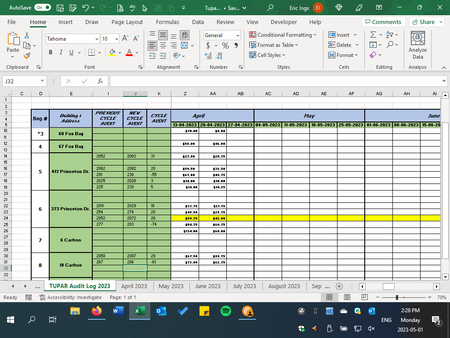

I glean from your spreadsheet image that your data entry will go into column J, and the formula you desire will be in column K.
PART 1
So the dryers have a rollover point of 299=>200. Do the washers also have a rollover point, and if so, what is it?
I have to assume that there would be no more than one rollover per machine per week.
If the washers have no rollover point, their column J values should always be larger than their column I values, so the formula does not need to make special allowance for them. The formula (specifically, for K10; after entry, copy it down) that takes care of both washers and dryers in that case would be:
IF(J10 = "", "", IF(J10 >= I10, J10 - I10, J10 + 100 - I10) )
(Spaces are included for readability; they are not required.)
PART 2
As for moving the old value of a cell to a different cell - this could be tricky. As you might suspect, there is no formula that moves cell values to a different cell.
The Excel object model does not support a "before the content is changed" event (just an "after the content is changed" event – the Worksheet_Change event).
So you might capture the old value during the Worksheet_SelectionChange event (i.e., as focus is moved to a (column J) cell. (A variation would use that event to show an InputBox or custom dialog to prompt for the new value whenever a column J cell was selected, but that might get annoying. Also...)
However, that event will not fire if, say, you have just opened the workbook and focus is on a cell you can overtype with a new value. So some additional code will be needed in the Workbook_Open and Worksheet_Activate events.
That will not work if you select multiple cells at once, e.g., before typing a value for multiple cells. To remind you, a warning can be given.
Here's code for the worksheet (TUPAR Audit Log 2023):
Option Explicit

    '====   MODULE-SCOPE VARIABLES
    Private mstrWatchedCellAddress  As String
    Private mvntWatchedCellValue    As Variant


Private Sub Worksheet_Activate()
    mstrWatchedCellAddress = ActiveCell.Address
    mvntWatchedCellValue = ActiveCell.Value
End Sub


Private Sub Worksheet_Change(ByVal Target As Range)

    Dim rngRelevantChangedCells As Range

    '----   Check to see if the change covers any watched cells.
    Set rngRelevantChangedCells = Intersect(Target, Range("J6:J750"))
    If rngRelevantChangedCells Is Nothing Then
        Exit Sub
    End If

    '----
    With rngRelevantChangedCells
        Debug.Assert .Address = mstrWatchedCellAddress
        '  --   Update the "Previous Cycle Audit" with the previously-
        '       captured value.
        Range("I" & CStr(.Row)).Value = mvntWatchedCellValue
        '  --   Save the new value.
        mvntWatchedCellValue = .Value
    End With

    '----   Clean up.
    Set rngRelevantChangedCells = Nothing

End Sub


Private Sub Worksheet_SelectionChange(ByVal Target As Range)

    Dim rngRelevantSelection    As Range

    '----   Check to see if the new selection covers any watched cells.
    Set rngRelevantSelection = Intersect(Target, Range("J6:J750"))
    If rngRelevantSelection Is Nothing Then
        Exit Sub
    End If

    '----
    With rngRelevantSelection
        If .Cells.Count > 1 Then
            Call MsgBox("Warning: Changing multiple New Cycle Amount cells " _
                    & "at once is not supported by this design." _
                    , vbExclamation Or vbOKOnly)
            GoTo CleanUp
        End If
        '  --   Capture information.
        mstrWatchedCellAddress = .Address
        mvntWatchedCellValue = .Value
    End With

CleanUp:
    Set rngRelevantSelection = Nothing

End Sub
Here's code for the workbook ("ThisWorkbook" in the Project Explorer window):
Option Explicit


Private Sub Workbook_Open()
    Sheets("SomeOther").Activate
    Sheets("TUPAR Audit Log 2023").Activate
End Sub
Obviously, replace "SomeOther" with the name of any worksheet other than TUPAR Audit Log 2023.
Alternatively, you could have a second copy of all the original values for column J, such as in a hidden worksheet, that is automatically refreshed each time the workbook is opened. Code for the Worksheet_Change event (invoked when you modify the "main" worksheet) would accept the new column J value, refer to the hidden worksheet for the prior value, update the column I value, and replace the hidden sheet's column J value.
PART 3
Putting an audit trail of changes on a separate worksheet seems appropriate. Other than code (VBA or Office Script), there's not a good way of making an audit trail. So, if VBA code is to be used, it will be placed in the Worksheet_Change event handler.
So where is this audit trail to be kept? In the month-specific worksheets? Some other worksheet? Which columns, and what are you capturing besides New Cycle Audit and date of change? Where is the machine identifier? I will not write sample code for this until you are more specific. Or maybe at this point you will need no further guidance.
