Forum Discussion

Jason Drew
Jun 14, 2018Iron Contributor
Locking a specific cell range based on a drop-down selection
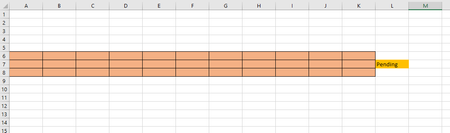
I would like to create a drop-down list in cell L7 (pending/approved) that would unlock/lock a specific cell range (A6:K8). The goal is that once the data is approved, it cannot be modifi...

Jason Drew
Jun 14, 2018Iron Contributor
I was able to find another code that does what I want. However, when I try to modify it to fit my needs, it doesn't work. Here is the code:
Option Explicit
Private Sub Worksheet_Change(ByVal Target As Range)
Application.ScreenUpdating = False
If Target.Cells.Count > 1 Then Exit Sub
If Not Intersect(Target, Range("C1")) Is Nothing And Target.Value = "No" Then
Worksheets("Sheet1").Protect Password:="Password"
Else
If Not Intersect(Target, Range("C1")) Is Nothing And Target.Value = "Yes" Then
Worksheets("Sheet1").Unprotect Password:="Password"
End If
End If
Application.ScreenUpdating = True
End Sub
How can I change which range of cells are being locked by this code? Thanks.