Forum Discussion

rbalza
Jul 30, 2021Brass Contributor
Lock cells with VBA script
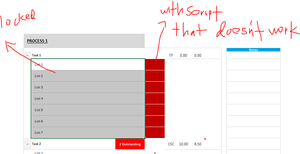
Hi everyone, could someone help me out on this one please. So I have locked specific cells (highlighted on the pic). However, there were an existing script beside it (with red formatted column) which...

rbalza
Aug 01, 2021Brass Contributor
Subodh_Tiwari_sktneer
Appreciated the time that you are taking on this. How can I lock an un-contiguous range? ie. C14:C20, C22:C23, C25:C26, and any other ranges per se? Thanks much!

Subodh_Tiwari_sktneer
Aug 02, 2021Silver Contributor
You may try something like this...
Dim rng As Range
Set rng = Range("C14:C20, C22:C23, C25:C26")
ActiveSheet.Unprotect 'Unprotect the sheet before you change the lock property along with the password if any
rng.Locked = True
ActiveSheet.Protect 'Protect the sheet again in the end- rbalzaAug 02, 2021Brass Contributor
Not sure what I have missed but there's an error to it. Error says "unable to set the Locked property of the Range class". Thanks!
- Subodh_Tiwari_sktneerAug 02, 2021Silver ContributorInsert a Breakpoint at the first line and then double click the cell the code will stop at the first line and then press F8 key to execute one line at a time and when you get that error, go to the Review Tab and check if the worksheet is unprotected.