Forum Discussion

LISTA DESPLEGABLE / REPETICIONES EN RANGO
- Jul 12, 2022
Trying to exclude selected names from the drop-downs would be tedious with so many different ranges.
I have added a Worksheet_Change event procedure to the worksheet module that prevents users from entering the same name twice on the same day. The workbook is now a macro-enabled workbook
(*.xlsm), so you'll have to allow macros.

Dear Mr. Vogelaar. Thank you very much for this modification in the worksheet. It works great, it's amazing. Now I can control that there are no repetitions on the same day of work assignment.
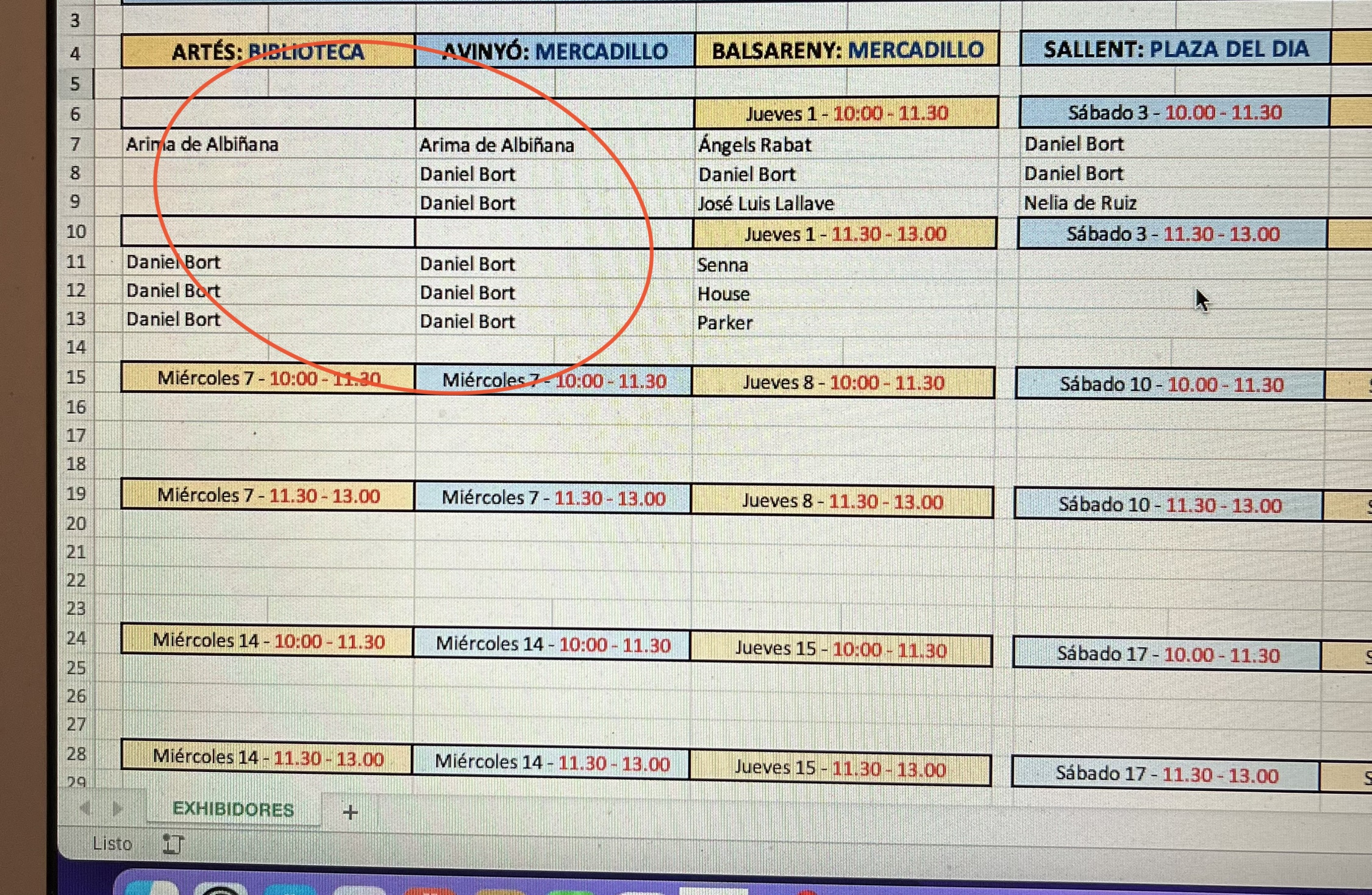
Two questions: Can I extend the macro to the days that it is not scheduled? That is, can I apply it to the cells where it is not programmed? And ... I could insert more participants?
Again, thank you very much.

You can view the code by right-clicking the sheet tab and selecting View Code from the context menu.
Private Sub Worksheet_Change(ByVal Target As Range)
    Dim Adr As Variant
    Dim Rng As Range
    If Target.CountLarge > 1 Then Exit Sub
    On Error GoTo ErrHandler
    Application.EnableEvents = False
    For Each Adr In Array("F7:F9,F11:F13", "I7:I9,I11:I13,K7:K9,K11:K13", _
        "B16:B18,B20:B22,D16:D18,D20:D22", "F16:F18,F20:F22", "I16:I18,I20:I22,K16:K18,K20:K22", _
        "B25:B27,B29:B31,D25:D27,D29:D31", "F34:F36,F38:F40", "I34:I36,I38:I40,K34:K36,K38:K40", _
        "B43:B45,B47:B49,D43:D45,D47:D49", "F43:F45,F47:F49", _
        "B55:B57,B59:B61", "D5:D57,D59:D61", "F55:F57,F59:F61", "I55:I57,I59:I61", "K55:K57", _
        "B16:B68,B70:B72", "D66:D68,D70:D72", "F66:F68,F70:F72", "I66:I68,I70:I72", "K66:K68,K70:K72")
        Set Rng = Range(Adr)
        Call CheckRange(Rng, Target)
    Next Adr
ExitHandler:
    Application.EnableEvents = True
    Exit Sub
ErrHandler:
    MsgBox Err.Description, vbExclamation
    Resume ExitHandler
End Sub

Private Sub CheckRange(ByVal Rng As Range, ByVal Target As Range)
    Dim Ar As Range
    Dim Cnt As Long
    If Not Intersect(Rng, Target) Is Nothing Then
        For Each Ar In Rng.Areas
            Cnt = Cnt + Application.CountIf(Ar, Target)
        Next Ar
        If Cnt > 1 Then
            MsgBox "Duplicate name!", vbExclamation
            Application.Undo
        End If
    End If
End Sub
You can add more ranges to be checked to the array.
And if you insert new names in the range O8:O23, they will automatically become available in the drop-down lists.
- Ricard_1967Jul 14, 2022Copper ContributorPerfect !!! -During tonight I will update the data and it seems to work very well.
I'm really grateful to you. If you pass through Barcelona I owe you a paella and a sangria!!!
Thank you very much again. - HansVogelaarJul 14, 2022MVP
Does this work better? I had made a couple of mistakes, and left out ranges that looked like they were not in use. I have added them now.
- Ricard_1967Jul 14, 2022Copper Contributor
HansVogelaarThese areas do not access the list. And I have tried to program them but they give me the error.
- Ricard_1967Jul 14, 2022Copper Contributor
Hi, and first of all, please excuse me for asking you so many times.
I apologize for any inconvenience this may be causing you.
I understand what you tells me to do and I've tried to do it, but I don't know something about Visual Basic.
1) Adding new participants in the O column does not extend the range.
2) When trying to add the missing cells, the programming instructions turn red.
I have tried to visualize the error that I have made but I cannot find it. I get the following message: Method "Range" of object '_Worksheet' failed.
Column O should be O5:O90 but it doesn't add or resize it.
The cells above Wednesday 7th and those corresponding to "Saturday 31st" don't access column O and give me that "Range" method failed error...
Could you suggest me a solution so that I can apply it to the programming of the macro?
Again, apologies. And thank you.