Forum Discussion

Excel not auto-filling formulas in an Excel Table
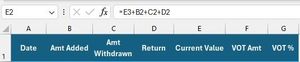
- Mar 31, 2024
I finally understand what you want to do and believe you can achieve it by using structured references and an OFFSET function to pick-up the number from the row below.
In E2 the formula becomes:
=[@[Amt Added]]+[@[Amt Withdrawn]]+[@Return]+OFFSET([@[Current Value]],1,0)and in F2:
=[@Return]+OFFSET([@[VOT Amt]],1,0)Make sure that these have filled down all the way to the bottom of the table.
When you now insert row 3, both formulas will auto-complete in the new row. See attached.
As to why the initial formula doesn't work, take a look at the formulas before you insert row 3.
From the start the formulas in E2 and F2 refer to cells E3 and F3. Insert row 3 and the references will update to E4 and F4 (i.e. two rows down), just as one would expect. The formulas on what is now row 4, still reference E5 and F5. I.e. only one row down. The same for all rows down the table.
Columns E and F now will no longer auto-complete as you have inconsistent formulas in them. Row 3 will be left blank and, the formulas in row 2 are wrong.


The community has been very helpful to me in the past. Just last year, someone helped me produce just such a table as you described.
So I'm the one who helped you with that spreadsheet a year ago (reading the exchange here between you and Riny_van_Eekelen reminded me of that exchange). I'm going to let my friend Riny continue to help here, but I do want to make a suggestion: Separate input from output.
In particular, you seem to be emphasizing needing to see the most recent entries, which is why you enter them at the top (this was part of last year's exchange too).....but we keep saying that tables work better if you enter new data at the bottom, This "expert approach" is actually better when you realize that all you're doing at the "input" end of things is collecting raw data. What you do with it--the "output"--is best separated, dealt with by some form of "dashboard" sheet, separate from the input (although still in the same workbook), where you can display whatever relevant data you need on a realtime basis, using FILTER and other tools to extract the most recent, most relevant from the raw historical records.

Thank you for your help in the past. The Diabetes table designed with a lot of help, that I have been using for some time, has worked well for me inserting at the top in descending order. I suppose your recommendation is a better approach, but I would not know how to implement it. That is well beyond my limited skills.
- mathetesMar 30, 2024Gold ContributorI'll see if I can take a look at the sheets you've attached later, then. What I'm suggesting isn't really all that difficult; it's maybe trickier when first doing it (involving a different conceptual framework), but in the long run easier to use and maintain.
- wcstarksMar 30, 2024Iron Contributor
I thought I had attached the actual Excel table, but I don't see it now. So, I will upload it. Most of the data is dummy data to conceal the actual amounts, but the table is otherwise an correct copy of the actual table. The formulas are in columns E and F. Thank you in advance. Again, row 2 exists only to preserve formatting when inserting next to the header. I suppose it will no longer be needed. The table will grow to several thousand rows. I hope I wouldn't need to navigate to the bottom each time I enter raw data. Avoiding that is what makes inserting at the top seem so natural.
- mathetesMar 31, 2024Gold Contributor
Here's an example of what I mean by the dashboard coupled with a database that just builds from the bottom. (And to assuage your concern, I have a database of over 9000 rows--all of my family financial transactions for a number of years--checks, credit cards, the whole bit--I always add to the bottom, and Excel remembers where I was last, so it usually opens to the bottom.)
But even if it doesn't, it's an easy matter to hit Command and the down arrow (on a Mac) from anywhere IN that database, in a column like date which is never empty, and Excel takes you to the bottom.
And then the "dashboard," where based on today's date and a self-selected N of your own choosing, it will display the most recent N days worth of rows.
Now, for some reason--maybe Riny_van_Eekelen knows a reason why this might happen--one of the two formulas auto-populates, but the other doesn't. I've tried several things to get it to start working, to no avail.