Forum Discussion

Link doesn't work
 Feb 24, 2026
Microsoft has confirmed as a known issue and it is being treated as a regression awaiting an engineering update. Today, one of the laptop has got latest Version 2602 Build 16.0.19725.20078 where links are working fine otherwise I ran Online Repair Office which works as well.

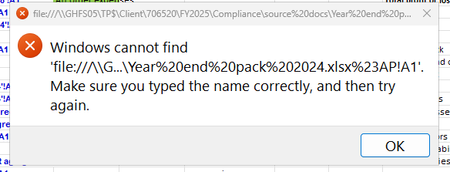
The error message shows Excel trying to open a file:/// link to a UNC path with URL-encoded spaces:
file:///\\G...\Year%20end%20pack%202024.xlsx%23API!A1
This is almost always a link parsing issue, not a missing file.
This strongly suggests a profile-specific Office/URL handler issue, not a global Excel or server problem.
Most Likely Cause
Excel 365 (newer builds like 2601) sometimes mishandles:
- URL-encoded file paths
- file:/// UNC format links
- FSLogix-mounted profile redirections
Especially when the hyperlink includes a cell reference (#API!A1).
Workarounds/Fix
Recreate the Hyperlink
From:
file:///\\Server\Share\Folder\Year%20end%20pack%202024.xlsx#API!A1
to:
\\Server\Share\Folder\Year end pack 2024.xlsx#API!A1
Or recreate using:
Right-click → Link → Existing File → browse to file
Do NOT paste a file:/// URL.
If this fixes it → your issue is URL encoding handling in that build.
If You Want a Permanent Technical Solution
If these are auto-generated links (SharePoint, scripts, etc.), modify them so they:
Don’t use:
file:///\\server\share\file.xlsx
Use:
\\server\share\file.xlsx
In the End, in AVD environments on 2601, the most consistent fix I've seen is:
Online Repair Office + disable Office file sync integration.
My answers are voluntary and without guarantee!
Hope this will help you.
Was the answer useful? Mark as best response and like it!
This will help all forum participants.