Forum Discussion

NMBarclay
Apr 05, 2023Copper Contributor
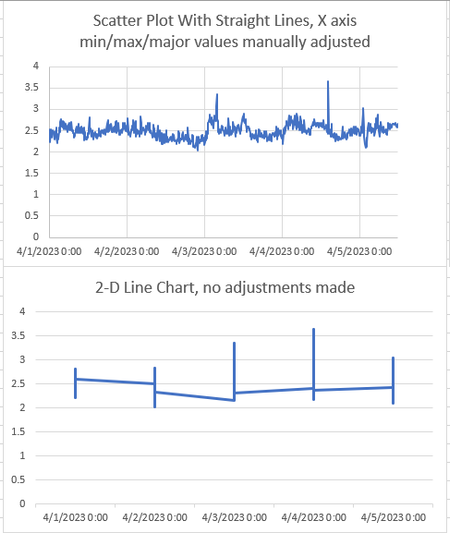
Line Charts generated from time-series data compress datapoints from each day into a single chunk
Hello, For my job, I need to generate a lot of charts to show how the temperature, pH, water flowrate, etc etc all change over time, so I create lot of line graphs for time-series data. However, ...

JoeUser2004
Apr 05, 2023Bronze Contributor
Perhaps if you google ``excel line charts support`` without quotes and read the webpage "Present your data in a scatter chart or a line chart" (click here), it will answer your question. Certainly not well-written. The gist is....
What you see is by design.
``[A] line chart only has one value axis (the vertical axis). The horizontal axis of a line chart only shows evenly spaced groupings (categories) of data. Because categories were not provided in the data, they were automatically generated, for example, 1, 2, 3, and so on.``
``As a general rule, use a line chart if your data has non-numeric x values — for numeric x values, it is usually better to use a scatter chart.``