Forum Discussion

Excel
Sep 30, 2020Iron Contributor
Kpi status with slicer
I was wondering if the KPI Status can be included for slicer tool filtering in the pivot table. Please help

Rajesh_Sinha
Oct 05, 2020Iron Contributor
Excel ,,
Possibly this may help you.
Source Tale:
N.B.
- Color is Helper Column, for neatness later on you may hide it.
- Formula in cell X2, fill it down.
=IF(W2>=6000,"Green",IF(W2>=1500,"Yellow",IF(W2<1500,"Red")))
Pivot Table & Slicer:
How it works:
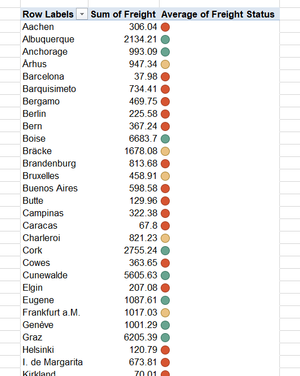
- Create PT, put City Name & Color in Row, and Sum Of Freight as Value.
- Select PT, Right click and from Pivot Tale Option dialogue, hit Display and un-check, Show Expand Collapse button.
3. In Data section, select Refresh Data When Open file.
4. Now create Slicer and from it's setting, set column to 3.
- You may keep as original also.
Now this is the tricky part.
- Apply Condition Formatting to each part separably.
- Select W18:W21 and apply ICON Set using following rules as show below.
3. Now copy Condition Formatting on W23 and W25:W30.
- Reason for doing this is to skip ROW Totals while Filter with Slicer.
Now start clicking slicer buttons to filter data.
:Green:
:Yellow:
:Red: