Forum Discussion

Kpi status with slicer
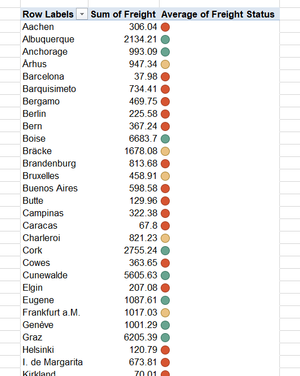

I understood your request, you can work around it by 1st ranking the original data using if condition, then you can create your slicer.
In this example, I labeled the data I have based on ranking, 1st 400 cities got "Green" then "Yellow" then "Red"
Then just add the slicer.
- SergeiBaklanOct 05, 2020Diamond Contributor
IMHO, such workarounds are quite limited since they are based on source data, not on calculated values as data model KPI. For example, if we have yellow for +-20 of average, red for below and green for upper values, this status will be shown not on only on all cities, but on filtered context as well. If we filter by country, that will be the status for this country average. Or for any filter we will apply.
- Rajesh_SinhaOct 06, 2020Iron Contributor
KPI should use basic as well calculated data,, and sometimes to fix the issue we have to follow non traditional methods, and that's what I did.
I've applied ICON sets on numeric column,, and while filter usually adjacent value appears, nothing new,, the method I've used address the core issue,, and it was only my intentions.

