Forum Discussion

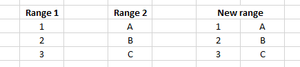
Join two spill ranges to one range with two columns
- Nov 14, 2022
For this task you can also use the CHOOSE() function in older Excel versions.
=CHOOSE({1,2},E4:E6,G4:G6)In cases where your Range 1 = E4:E6 and Range 2 = G4:G6.
In older versions of Excel you have to finish this with CTRL + SHIFT + ENTER as an array formula.


Both of your solutions work but I have to expand it to joining to arrays with multiple columns, do you have a solution for that?
I tried a simple expansion of both of your formulas but either seem to work.
Thanks in advance!
P.s., yes I have 365 but without HSTACK due to semi-annual channel, you're right

Somewhat less elegant but playing with indices will work.
= LET(
      k, SEQUENCE(1,6),
      h, SEQUENCE(3),
      IF(k<4, array1#, INDEX(array2#,h,k-3))
   )
Of course, provided you have Lambda, you could always provide some window dressing
WorksheetFormula
= HStackλ(array1#, array2#)

HStackλ
= LAMBDA(a₁, a₂,
     LET(
        k, SEQUENCE(1, COLUMNS(a₁) + COLUMNS(a₂)),
        h, SEQUENCE(MAX(ROWS(a₁), ROWS(a₂))),
        IF(k < 4, a₁, INDEX(a₂, h, k - 3))
     )
  )
Then again, you could make a case to corporate IT to put you on to the Insider beta channel so that you could preview new functionality on behalf of the company.
- mlylylyNov 18, 2022Copper ContributorWhat I was looking for, thanks a lot!