Forum Discussion

Iteration error
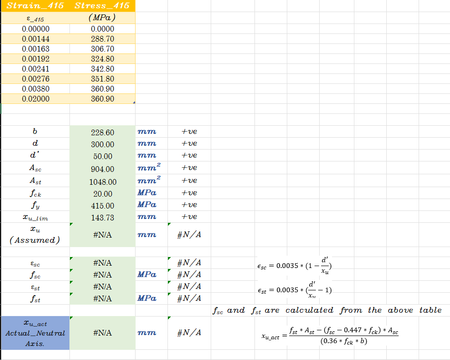
- Nov 25, 2024
It seems your circular reference iterations diverge. I got a solution using goal-seek to reduce the differences to zero. With 365 it would be possible to write an iterative solution that would converge, even if it meant replicating an automated version of goal-seek.


Thank you for your support.
I have checked your sol. in working well, but each time data changes (like b,d,Ast,Asc, etc.), the result does not update automatically each time we have to perform goal-seek. Can we make it dynamic in nature so it can update automatically?
I also have to add some constraints, like fst and fsc should not exceed 360.90, and Xu must be in the range of d' and d; otherwise, it shows out of range.
Thanks and regards.
MSRAZA.
- PeterBartholomew1Nov 26, 2024Silver Contributor
I suspect it is the non-linearity inherent in your stress-strain relationship that is causing the iteration to diverge, though the other closed-form formulas may introduce further convergence issues.
I seem to remember such relationships as being approximated in the form
= 1000 * ( (stress/coef)+(1/m)*(stress/coef)^m ) * (coef/E)
which as least wouldn't flat-line at 360.90 .
I think you either need to spend time analysing the problem and trying to transform it to something better conditioned, or you need to implement the search (probably using bisection) as an Excel function. This could be achieved with a 365 Lambda function or, on older versions of Excel, you would need to write a UDF using VBA. I cannot remember whether Goal Seek is itself functionality that may be called from VBA. It could be that macro recorder would show something but that is not a conclusive test.
I tried this and it recorded
Sub converge()
'
' converge Macro
''
    Application.CutCopyMode = False
    Range("B21").GoalSeek Goal:=0, ChangingCell:=Range("B20")
End Sub
so maybe you are in luck and a solution is a button click away if not fully automatic!