Forum Discussion

Issues on dynamic ranges for drowpdown lists in excel
- Jun 10, 2022
You don't need sheet name in reference, just
If you add more values into the table data validation picks the up if the table and the cell(s) with data validation are in the same sheet.
Alternatively in Name Manager you may define the name (e.g. DVList) as =Table1[City] and use =DVList in data validation.

You don't need sheet name in reference, just
If you add more values into the table data validation picks the up if the table and the cell(s) with data validation are in the same sheet.
Alternatively in Name Manager you may define the name (e.g. DVList) as =Table1[City] and use =DVList in data validation.

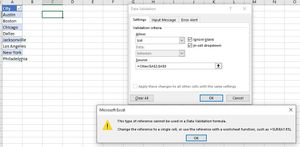
What you are suggesting is exactly what i want to do, but then, when i do it, it ends with the error message in the screen capture in my previous message.
what i want is that error message to end,
Regards
WunterSlaus
- SergeiBaklanJun 11, 2022Diamond Contributor
It's hard to say what's wrong without the file. Please check attached one if it works in your environment.
- WunterSlausJun 16, 2022Copper Contributor
your attached file was very helpful, i have it working now
Thank you very much
Regards
Corstiaan
- SergeiBaklanJun 16, 2022Diamond Contributor
WunterSlaus , you are welcome