Forum Discussion

Issue with INDIRECT formula
- Jun 23, 2025
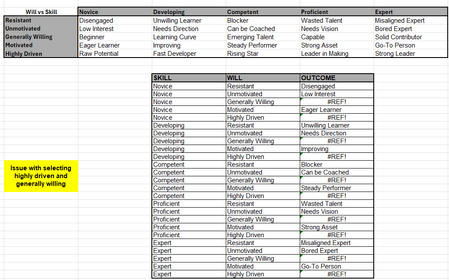
Your errors occur only when the reference in the INDIRECT function contains a space. Named ranges may not have spaces or other special characters in them. Excel replaced them with an underscore.
So, in your case, J18 contains “Generally Willing”. Change that to “Generally_Willing” or use SUBSTITUTE within INDIRECT. Something like:
=INDIRECT(SUBSTITUTE(J18, “ “, “_”))
Similar for “Highly Driven”.

Your errors occur only when the reference in the INDIRECT function contains a space. Named ranges may not have spaces or other special characters in them. Excel replaced them with an underscore.
So, in your case, J18 contains “Generally Willing”. Change that to “Generally_Willing” or use SUBSTITUTE within INDIRECT. Something like:
=INDIRECT(SUBSTITUTE(J18, “ “, “_”))
Similar for “Highly Driven”.
 Frostyboy86Jun 24, 2025Copper Contributor
Hi Riny, thank you for your help you are absolutely right, excel wasn’t happy with the space.
i added in the underscore and this resolved the issue immediately.
Thank you for taking the time to help me out
Regards James