Forum Discussion

Is there a way to make a Form Control Checkbox make an embedded checkbox =True
- May 22, 2025
I will assume that the check boxes are named Check Box 1, Check Box 2, ..., Check Box 5.
Create the following macro in a standard module:
Sub CheckBox_Click()
    Dim i As Long
    Dim f As Boolean
    f = True
    For i = 1 To 5
        f = f And (ActiveSheet.Shapes("Check Box " & i).ControlFormat.Value = 1)
    Next i
    Range("B2").Value = f
End Sub
Assign the CheckBox_Click macro to each of the check boxes in C2.


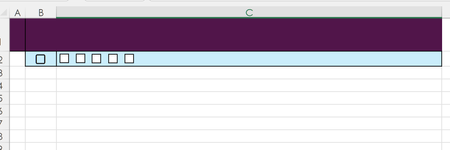
You have already accepted a solution that requires VBA, but why not get rid of the form controls. If you want/may, use 6 embedded check boxes as shown in the picture below and add a simple formula that returns either TRUE or FALSE 'under' the checkbox in B2. The latter will be checked only when all the others are checked.
 itsMontyMay 23, 2025Brass Contributor
I already used VBA to put several timers in the worksheets so I figured, since I'm already there, I'd use Form Control checkboxes to reduce the amount of columns required for the task. I really didn't know how it would end up, just what was needed, so I pretty much have been creating as I go along.
But now that I seen so many options perhaps I will rebuild the project with embedded checkboxes once I've seen the end product.
Thank you for the advice!
cheers