Forum Discussion

JasminJane24
Mar 14, 2023Copper Contributor
Inserting Single Observation Data into page with Multiple Observations
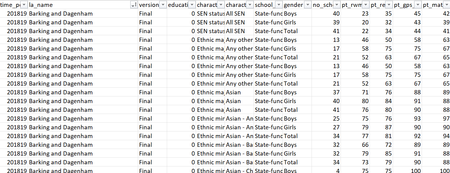
Hi all, I am currently trying to insert data on local authority income into the top table. My issue is I have multiple observations for each local authority (as seen in top picture) so c...

mathetes
Mar 14, 2023Gold Contributor
If I'm understanding what you're seeking, the VLOOKUP function (or any of many variations on that classic Excel function, also available at the page I've linked to) would give that to you. Something like
=VLOOKUP(B2,incometable,2,0), where
- B2 is the column in your first table;
- you replace incometable with whatever the range is in the second, where those income values reside,
- 2 is the offset, and 0 just means "exact" -- see the link above for the syntax of VLOOKUP
By the way, =VLOOKUP(B2,incometable,3,0) would be used to get the second income value, the offset being to the third column.
If you want further help in implementing that, please post a copy of your actual spreadsheet(s) on OneDrive or GoogleDrive and paste a link here. Images are useful to a certain extent, but the actual files more useful.

JasminJane24
Mar 16, 2023Copper Contributor
Thank you for your help!
Unfortunately I am still struggling and getting an error message:
https://1drv.ms/x/s!AnEdQzIOtw1WgY42WqxuKnZgkBc5dw?e=LWbTYq
This is the link to the data.
Many thanks!
Unfortunately I am still struggling and getting an error message:
https://1drv.ms/x/s!AnEdQzIOtw1WgY42WqxuKnZgkBc5dw?e=LWbTYq
This is the link to the data.
Many thanks!
- mathetesMar 16, 2023Gold ContributorUnfortunately, that link only reveals one worksheet, that being the one you depicted first in your original post. Where is the "local authority income" data?