Forum Discussion

jgrimes613
May 10, 2024Copper Contributor
Insert Blank Row between Filters using VSTACK
I have a working VSTACK formula with 2 filters. I would like to insert a blank row or even a copied header row between the two filter in order to separate the data visually on the combined sheet. ...
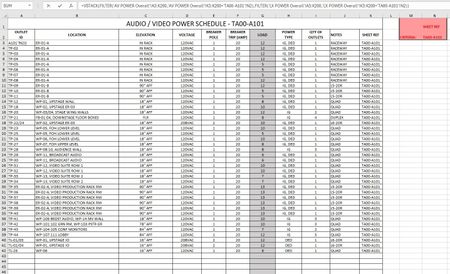
- May 10, 2024
As variant
=VSTACK(
  headers,
  FILTER('AV POWER Overall'!A3:K200,'AV POWER Overall'!K3:K200='TA00-A101'!N2),
  IF( COLUMN(headers), "" ),
  FILTER('LX POWER Overall'!A3:K200,'LX POWER Overall'!K3:K200='TA00-A101'!N2)
)
where the headers is the reference on related range.

SergeiBaklan
May 10, 2024Diamond Contributor
As variant
=VSTACK(
  headers,
  FILTER('AV POWER Overall'!A3:K200,'AV POWER Overall'!K3:K200='TA00-A101'!N2),
  IF( COLUMN(headers), "" ),
  FILTER('LX POWER Overall'!A3:K200,'LX POWER Overall'!K3:K200='TA00-A101'!N2)
)
where the headers is the reference on related range.

jgrimes613
May 10, 2024Copper Contributor
This is perfect! Thank you.
How difficult would it be to apply a fill to that row as well?
How difficult would it be to apply a fill to that row as well?
- SergeiBaklanMay 10, 2024Diamond Contributor
You are welcome. Instead of
IF( COLUMN(headers), "" ),you may use
IF( COLUMN(headers), REPT("|",25) ),or like