Forum Discussion

Increase size of Evaluate Formula Dialog Box
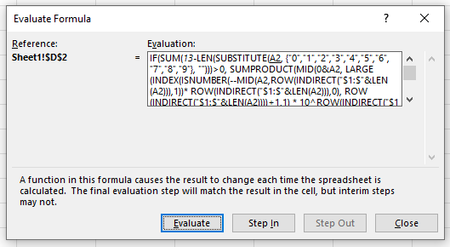

FG_Availibility Formula is defined as follows and it further calls the multiple helper and intermediate functions:
=IFNA( IFS( CC_IsPast,"--", AND(NOT(CC_HaveTasks),CC_IsToday),"Target Achieved", AND(FI_MaxSlotsToday>=7,OR(CC_IsFuture,CC_IsToday)), "Available", AND(AND(FI_MaxSlotsToday>=5, FI_MaxSlotsToday<=6),OR(CC_IsToday,CC_IsFuture)), "Partially Available", AND(AND(FI_MaxSlotsToday>=2,FI_MaxSlotsToday<=4),OR(CC_IsToday,CC_IsFuture)), "Difficult", AND(FI_MaxSlotsToday=1,OR(CC_IsFuture,CC_IsToday)), "Very Difficult", AND(FI_MaxSlotsToday=0,OR(CC_IsFuture,CC_IsToday)), "NOT Available", AND(FI_MaxSlotsToday<1,OR(CC_IsToday,CC_IsFuture)), "Invalid Targets" ),"Add new Week in summary")

I just realized you never actually say you're looking for help with this formula. The whole point up till now has been that "the dialog box for evaluating formulas needs to be larger."
So are you asking for help with the formula as well?
I find it easier to analyze, though still not easy for a formula this long, to display it thus:
=IFNA(
IFS(
CC_IsPast,"--",
AND(NOT(CC_HaveTasks),CC_IsToday),"Target Achieved",
AND(FI_MaxSlotsToday>=7,OR(CC_IsFuture,CC_IsToday)), "Available",
AND(AND(FI_MaxSlotsToday>=5, FI_MaxSlotsToday<=6),OR(CC_IsToday,CC_IsFuture)), "Partially Available",
AND(AND(FI_MaxSlotsToday>=2,FI_MaxSlotsToday<=4),OR(CC_IsToday,CC_IsFuture)), "Difficult",
AND(FI_MaxSlotsToday=1,OR(CC_IsFuture,CC_IsToday)), "Very Difficult",
AND(FI_MaxSlotsToday=0,OR(CC_IsFuture,CC_IsToday)), "NOT Available",
AND(FI_MaxSlotsToday<1,OR(CC_IsToday,CC_IsFuture)), "Invalid Targets" ),
"Add new Week in summary")
And quickly scanning that I don't see any syntax errors.....so what (if you are seeking help with the formula per se) happens when it's in context?