Forum Discussion

incorrect formulation
- Jul 20, 2020
NikolinoDE I didn't see any change in your conditional formatting formula. I implemented the last suggestion I made in the attached sheet and added more so it will check what day it is and auto-index down on the Jan sheet so 1 conditional formatting formula will work for every day in that month (I added the 2nd to the range and leave it to you to add the rest). You still need to tweak the formula for each category (MA1, MA2, etc...) since each needs its own color.
I also changed the formula to >= the start time but < end time because the don't actually work that hour/ half-hour period.
I also noted and corrected that your 1st 06:00am was actually 06:00am the next day and your 06:00am at the end was 05:59.999999999am (floating point error). You may want to look at the rest of the times and days for those and similar errors also.

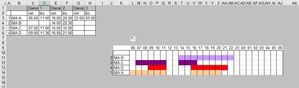
In the end, I would like to enter the times from C3 to H6 (see picture at the beginning) and they should appear automatically in the timeline ... also, as I said, if the end time is less than the start time.
Thx
Nikolino

NikolinoDE I added the extra condition to SergeiBaklan sheet (see attached):
=((J$7>=$C4)*(J$7<=$D4)+(J$7>=$E4)*(J$7<=$F4)+(J$7>=$G4)*(J$7<=$H4)+($H4<$G4)*(J$7>=$G4)*(J$7<=$H4+1))
note you could still do all this using AND and OR conditions (AND = * and OR = +)
NOTE: this is only accounting for the case where col H is supposed to be >24hrs day but typed in without the added day. If you have a chance of other times being typed in 'incorrectly' that way (e.g. col G = 00:30 and col H = 05:30) then you may need another condition for that.