Forum Discussion

Import data from a folder with different fileformats
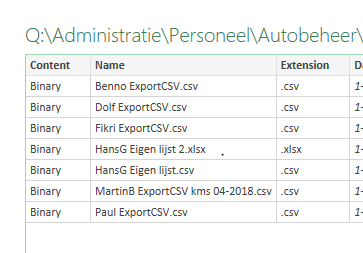
- Aug 03, 2018Hi Hans, you'll need to do separate queries and then combine them into a 3rd.
So one set of of queries for the CSV files (using filter just to choose csv) and then one set of queries filtering for xlsx.
Then append the 2 sets assuming they need to be appended.


To expand a bit what Wyn suggested.
Create two function, one to get csv file
let
    fnGetCSV = (FilePath as text) => let
    Source = Csv.Document(File.Contents(FilePath),
        [Delimiter=",", Columns=2, Encoding=65001, QuoteStyle=QuoteStyle.None]),
    PromotHeaders = Table.PromoteHeaders(Source, [PromoteAllScalars=true])
    in
        PromotHeaders
in
    fnGetCSV
and another for Excel file
let
    fnGetExcel = (FilePath as text) => let
    Source = Excel.Workbook(File.Contents(FilePath), null, true),
    GetFirstSheet = Table.SelectRows(Source, each [Kind] = "Sheet"){0}[Data],
    PromotHeaders = Table.PromoteHeaders(GetFirstSheet, [PromoteAllScalars=true])
    in
        PromotHeaders
in
    fnGetExcel
Here we always take first sheet of the file (you could change that).
After that use connector to the folder with your files and edit the query. Remove all columns but these ones
and add custom column with
remove all but this new column and expand it. After that cosmetic if necessary
Resulting script is
let
    Source = Folder.Files(pMyFolder),
    RemoveUnused = Table.SelectColumns(Source,{"Name", "Extension", "Folder Path"}),
    AddFunctions = Table.AddColumn(RemoveUnused, "GetFile", each if [Extension] = ".xlsx"
        then fnGetExcel([Folder Path]&[Name])
        else fnGetCSV([Folder Path]&[Name])),
    KeepTables = Table.SelectColumns(AddFunctions,{"GetFile"}),
    ExpandTable = Table.ExpandTableColumn(KeepTables, "GetFile", {"Car", "Date"}, {"Car", "Date"}),
    ChangeType = Table.TransformColumnTypes(ExpandTable,{{"Car", type text}, {"Date", type date}})
in
    ChangeType
and attached.
- DeletedAug 08, 2018Not applicable
Hi,
As i'm just starting with PQ, it was easier to make 2 seperate queries and combine them in a 3rd. But you set me in the right direction anyway, so thanks very much for your help and the examplefile!
Regards,
Hans
- SergeiBaklanAug 08, 2018Diamond Contributor
Hi Hans,
I see your point, thank you for the feedback. If you have very few files in the folder with unchanged names/types separate queries work fine in any case. If bunch of files with changeable names - better to automate, otherwise maintenance overhead will be too high.
Good luck with PQ, that's nice and powerful product.