Forum Discussion

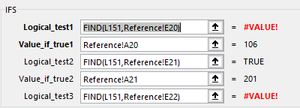
IFS Shows #VALUE! instead of actual value
- May 10, 2021
See the attached version.

You could use
=IFS(ISNUMBER(FIND(L151,Reference!E20)),Reference!A20,ISNUMBER(FIND(L151,Reference!E21)),Reference!A21,...)
But this is probably much more efficient:
=INDEX(Reference!$A$20:$A$50, MATCH("*"&L151&"*", Reference!$E$20:$E$50, 0))
Adjust the ranges if needed.

Thank you @Hans!
I should have included more data. The value I am searching on can be either a number or text in case this matters which I think in your first example probably would make a difference. Sorry for not being more comprehensive.
For example cell E15 contains the following choices:
A0, A1, A2, A3, A4, 89, OE
If a value is found in this cell then return the value in cell A15 which is:
101
Then in a subsequent logical test the following choices are available in cell E20
11, 13, M0 ,M1, M2 ,M3, M4
If a value is found in this cell then return the value in cell A20 which is:
106
etc.
Unfortunately I can have a lookup value in more than one reference range i.e. cell E21
51, 55, 89, OE
Values 89 and OE are also shown in cell E15. I was going to try and use and AND in my IFS lookup to include the values in column D which will make the combination of values in E and D unique. I am probably explaining this in a needlessly cumbersome way.
This might make it easier to follow:
Lookup table i.e. Reference tab
So if a value is found in E and D then bring back value in A
Lookup values:
Thanks again for your help and suggestions.
I have not used index and match but need to begin doing so. I might need to convert the Reference values into an array.
- SergeiBaklanMay 10, 2021Diamond Contributor
- tombabcdMay 10, 2021Copper ContributorHi Sergei, I have never used XLOOKUP but learning all kinds of new, useful functions. Thank you for taking the time to respond!!!
- HansVogelaarMay 10, 2021MVP
Could you attach a small sample workbook (without sensitive information)?
- tombabcdMay 10, 2021Copper Contributor
- HansVogelaarMay 10, 2021MVP
See the attached version.
