Forum Discussion

tombabcd
May 10, 2021Copper Contributor
IFS Shows #VALUE! instead of actual value
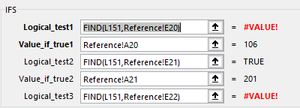
Cannot determine why #VALUE! is shown instead of 201. Per help on IFS, the value should be returned for the first TRUE response which in this case is shown for Logical_test2 - T...
- May 10, 2021
See the attached version.


SergeiBaklan
May 10, 2021Diamond Contributor
IFS() check till first TRUE condition and skips FALSE condition. If no one TRUE condition is met formula returns #N/A error. However, if !VALUE# is result of checked condition, entire formula returns !VALUE# as well.
In your case the workaround is to use ISNUMBER(FIND(...)) instead of FIND(). But better formula HansVogelaar suggested.
 tombabcdMay 17, 2021Copper ContributorHi Sergei, thank you for your response earlier. Can I ask you where to seek advanced Excel training classes, courses, workshops, etc., where I can learn these advanced skills? I took Advanced and Intermediate Excel classed through Ed2Go but they didn't begin to cover these kinds of functions in depth. Thank you. Tom
- tombabcdMay 10, 2021Copper ContributorThank you very much Sergei! I will try the ISNUMBER per your suggestion. Thanks again!!!