Forum Discussion

Lgibson500
Feb 21, 2020Copper Contributor
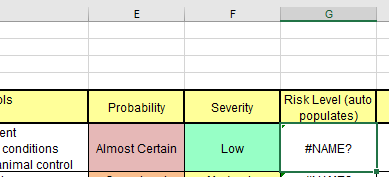
IFS formula returning #NAME?
Why would this formula be returning #NAME? IFS(AND(E6="Rare",F6="Low"),"Minimal",AND(E6="Rare",F6="Moderate"),"Minimal",AND(E6="Rare",F6="Critical"),"Minimal",AND(E6="Rare",F6="Catastrophic"),"Moder...
- Feb 21, 2020
For such sample
formula in G6 is
=IFNA(INDEX($J$5:$M$7,MATCH($F6,$I$5:$I$7,0),MATCH($E6,$J$4:$M$4,0)),"wrong data")Matrix itself could be at any place, better in another sheet. And better to use named ranges for it.

Lgibson500
Feb 21, 2020Copper Contributor
I am not sure how to index match but I will try that option.

SergeiBaklan
Feb 21, 2020Diamond Contributor
For such sample
formula in G6 is
=IFNA(INDEX($J$5:$M$7,MATCH($F6,$I$5:$I$7,0),MATCH($E6,$J$4:$M$4,0)),"wrong data")Matrix itself could be at any place, better in another sheet. And better to use named ranges for it.
- Lgibson500Feb 21, 2020Copper Contributor
Thank you, this works great on intermittent cells. I will have to figure out why I am getting #REF! answer in others.