Forum Discussion

Edg38426
Nov 09, 2021Brass Contributor
IF/AND Formula Not Working
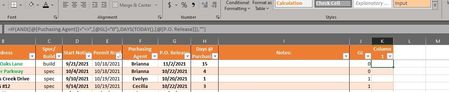
I am trying to formulate a column that will return a DAYS formula result if multiple conditions are met, or a blank cell if they are not. Whatever I do, though, is returning a blank value. The f...
- Nov 09, 2021
I miss nonblank checking. It'll be
=IF(AND([@[Puchasing Agent]] <>"",[@GL]=0),TODAY()-[@[P.O. Release]],"")

SergeiBaklan
Nov 09, 2021Diamond Contributor
[GL] column contains numbers, not texts. Perhaps you mean "<>",[@GL]=0 (not "<>",[@GL]="0")
 Edg38426Nov 09, 2021Brass ContributorMy intent here is this: If there is data in the Purchasing Agent field (meaning that it has been assigned to said agent) AND there is not a GL entry yet (currently being calculated using a COUNTIF formula which references another worksheet in this same workbook), then I need to be able to see the number of days that have passed since the Agent has released the job (days from P.O. Release field). Is there perhaps an easier way to do this?
- Edg38426Nov 09, 2021Brass ContributorThank you for replying. I just tried changing it per your suggestion, but it did not affect the return value.
- SergeiBaklanNov 09, 2021Diamond Contributor
I miss nonblank checking. It'll be
=IF(AND([@[Puchasing Agent]] <>"",[@GL]=0),TODAY()-[@[P.O. Release]],"")- Edg38426Nov 09, 2021Brass Contributor
That worked perfectly. Thank you so much for your help!