Forum Discussion

If Then Statements Across 2 Spreadsheets
- Nov 21, 2022
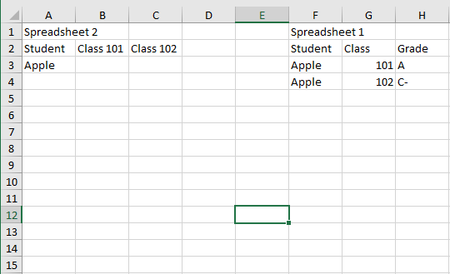
With a layout like this:
In B2 on Spreadsheet 2:
=IFERROR(INDEX(Sheet1!$C$2:$C$200,MATCH(1,(Sheet1!$A$2:$A$200=$A2)*(Sheet1!$B$2:$B$200=B$1),0)),"-")
If you don't have Microsoft 365 or Office 2021, confirm the formula by pressing Ctrl+Shift+Enter.
Fill down, then to the right or vice versa.
See the sample workbook below.

With a layout like this:
In B2 on Spreadsheet 2:
=IFERROR(INDEX(Sheet1!$C$2:$C$200,MATCH(1,(Sheet1!$A$2:$A$200=$A2)*(Sheet1!$B$2:$B$200=B$1),0)),"-")
If you don't have Microsoft 365 or Office 2021, confirm the formula by pressing Ctrl+Shift+Enter.
Fill down, then to the right or vice versa.
See the sample workbook below.

HansVogelaar thank you, this worked! Very grateful. For next semester, when I run a new report for next semester's grades, is there a way to import new grade data into this, so I have a running history of grades?
- HansVogelaarNov 22, 2022MVP
- dm3333Dec 02, 2022Copper Contributor
I figured out how to run a report for all time grades for specific courses, and can run that quarterly for Sheet1. For Sheet2, I'll continually update the list of students I need to track - I think this will work. The one place I'm stuck is that I only want to see grades of C, C+, B-, B, B+, A-, A, and A+ in Sheet 2. If a student didn't earn one of those grades, I want the cell to show empty for that class. The challenge is that some students fail a class and then retake, so I only want to capture in Sheet2 when they earn one of the grades above. Is there a way to do this automatically? Thanks for your reply, this is immensely helpful!
- HansVogelaarDec 03, 2022MVP
Perhaps Power Query would be better for this. Anyone?