Forum Discussion

dm3333
Nov 21, 2022Copper Contributor
If Then Statements Across 2 Spreadsheets
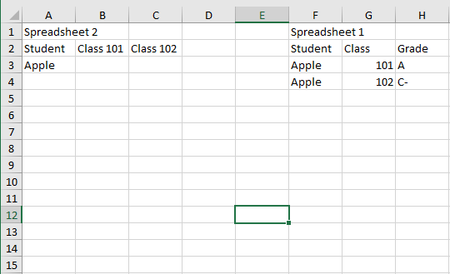
Every semester our school gives us a big report of class grades but I only need to track some students and classes. How can I set it up so I can match students names and classes and return specific g...
- Nov 21, 2022
With a layout like this:
In B2 on Spreadsheet 2:
=IFERROR(INDEX(Sheet1!$C$2:$C$200,MATCH(1,(Sheet1!$A$2:$A$200=$A2)*(Sheet1!$B$2:$B$200=B$1),0)),"-")
If you don't have Microsoft 365 or Office 2021, confirm the formula by pressing Ctrl+Shift+Enter.
Fill down, then to the right or vice versa.
See the sample workbook below.


PeterBartholomew1
Nov 21, 2022Silver Contributor
I started with Power Query to avoid the use of formulas between workbooks which, rightly or wrongly, I tend to regard as somewhat fragile.
I haven't as yet used the classlist from the destination table. It should be the basis of a filter or join, but I claim no PQ expertise!
let
    Source = Excel.Workbook(File.Contents("C:\Users\Peter\OneDrive\BigReport.xlsx"), null, true),
    Table1_Table = Source{[Item="Table1",Kind="Table"]}[Data],
    #"Changed Type" = Table.TransformColumnTypes(Table1_Table,{{"Student", type text}, {"Class", Int64.Type}, {"Grade", type text}}),
    #"Filtered Rows" = Table.SelectRows(#"Changed Type", each ([Student] <> "Banana")),
    #"Pivoted Column" = Table.Pivot(Table.TransformColumnTypes(#"Filtered Rows", {{"Class", type text}}, "en-GB"), List.Distinct(Table.TransformColumnTypes(#"Filtered Rows", {{"Class", type text}}, "en-GB")[Class]), "Class", "Grade")
in
    #"Pivoted Column"