Forum Discussion

if the date column is NA or 0 how to show 0 in the auto formula?
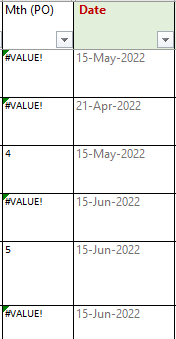

@Riny, thanks it works,
One question, what if the date col I put as NA? If I change to
=IF(ISNA(B2),"",MONTH(B2)) the return show 1, is there any way to show empty if input is NA?
Thank you

bbsin ISNA check for the error value #N/A that usually is the result of a lookup function where no match is found. If you are just entering text like NA, you should change the formula to:
=IF(B2="NA","",MONTH(B2))
- bbsinJul 11, 2022Iron Contributor
Thank you the formula works, however, may I know why is there an icon appear?
Do I need to do anything about it? Thank you
- Riny_van_EekelenJul 11, 2022Platinum Contributor
bbsin Excel has background error checking activated by default. It may spot real errors but it also alerts you when it notices inconsistent formulas (like in your case), numbers formatted like text etc.
If you are convinced there's nothing wrong, ignore the alert. Personally, I found this "feature" quite irritating and switched it off.
- bbsinJul 14, 2022Iron ContributorThank you for your help.