Forum Discussion

if the date column is NA or 0 how to show 0 in the auto formula?
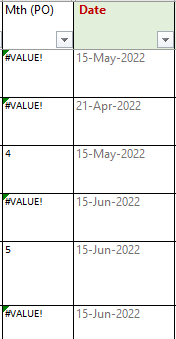

bbsin Not sure why you have a value error where you have a date and 4 when the date in B is in May
Suppose the first date in your example is in B2, then the formula in A2 should be:
=IF(ISBLANK(B2),"",MONTH(B2))
and copy it down. This will return the month number or a blank if B2 is empty.
 bbsinJul 07, 2022Iron Contributor
@Riny, thanks it works,
One question, what if the date col I put as NA? If I change to
=IF(ISNA(B2),"",MONTH(B2)) the return show 1, is there any way to show empty if input is NA?
Thank you- Riny_van_EekelenJul 07, 2022Platinum Contributor
bbsin ISNA check for the error value #N/A that usually is the result of a lookup function where no match is found. If you are just entering text like NA, you should change the formula to:
=IF(B2="NA","",MONTH(B2))
- bbsinJul 11, 2022Iron Contributor
Thank you the formula works, however, may I know why is there an icon appear?
Do I need to do anything about it? Thank you