Forum Discussion

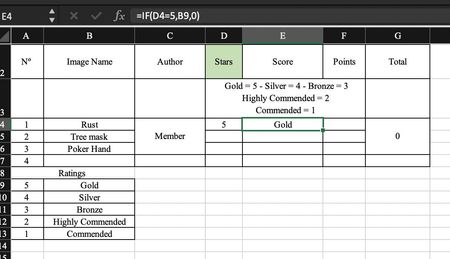
If Condition with text and multiple options
- Sep 30, 2020
Hi FreddyNoel ,
There are many ways to handle it, please find below you may construct your formula using VLOOKUP. your source data should be in ascending order to get the results.
=VLOOKUP(D4,$A$9:$B$13,2,TRUE)Attached is the sample file for your reference
Regards, Faraz Shaikh | MCT, MIE, MOS Master, Excel Expert
If you find the above solution resolved your query don't forget mark as Official/Best Answer to help the other members find it more


Here is the file with the desired colors.
At the same time information on how to do conditional formatting in Excel
Use conditional formatting to highlight information
I would be happy to know if I could help.
Nikolino
I know I don't know anything (Socrates)
* Kindly Mark and Vote this reply if it helps please, as it will be beneficial to more Community members reading here.

Hello, Nikolino,
Sorry for my late acknowledgement as I had a busy day.
FANTASTIC! I am in awe by your knowledge and kind contribution to making my spreadsheet an absolute gem.
I would not have been able to do it without your help.
The link to the Conditional Formatting is brilliant and very clear.
A million thanks again.
Best regards
FreddyNoel
- NikolinoDEOct 26, 2020Platinum ContributorYour welcome
I was pleased to be able to help you.
Nikolino
I know I don't know anything (Socrates) - FreddyNoelOct 25, 2020Copper Contributor
A million thanks again, Nikolino.
You are a Wizard, doing magic with Excel.
Best regards
Frederic
- NikolinoDEOct 23, 2020Platinum Contributor
Add this formula into cell M4 and drag the cell down (to the next cell, etc.)
See the attached file.
German formula:
=KGRÖSSTE(J4:J6;1)+KGRÖSSTE(J4:J6;2)
English formula:
=LARGE(J4:J6,1)+LARGE(J4:J6,2)
I would be happy to know if I could help.
Nikolino
I know I don't know anything (Socrates)
* Kindly Mark and Vote this reply if it helps please, as it will be beneficial to more Community members reading here.
- FreddyNoelOct 23, 2020Copper Contributor
Hello Nikolino,
I am stuck again after finding out that I made a mistake with my ratings.
If you can help again, please, I would be much grateful.
In the column Total M, each member's Total should be the sum of the TWO HIGHEST Scores ONLY, out of 3 marks.
For example, Member 1 Total should be 1.25 and Member 2 shall be 2.50
I have tried but lamentably failed to find the right formula.
Thank you if you can offer a solution.
Best regards
Frederic
- NikolinoDEOct 02, 2020Platinum ContributorI was pleased to be able to help you.
I wish you a nice day / night
Nikolino
I know I don't know anything (Socrates)