Forum Discussion

gretacristina
Nov 03, 2022Copper Contributor
IF, AND, OR HELP
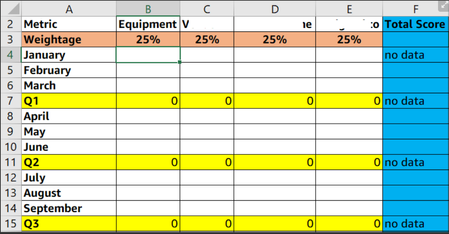
Hello team, I'm reaching out regarding this previous post: https://techcommunity.microsoft.com/t5/excel/if-and-or-help/m-p/3602812/highlight/true I'm struggling again with formulas. What I'm ...
 Nov 03, 2022
=IFERROR(AVERAGE(IF('Dashboard Data'!$B$2:$B$22=$A4,IF('Dashboard Data'!$G$2:$G$22>=0.8,5,IF('Dashboard Data'!$G$2:$G$22>=0.7,4,IF('Dashboard Data'!$G$2:$G$22>=0.6,3,IF('Dashboard Data'!$G$2:$G$22>0.5,2,IF('Dashboard Data'!$G$2:$G$22<=0.5,1,""))))))),"")For the AVERAGE in column G you can try this formula. Enter the formula with ctrl+shift+enter if you don't work with Office365 or 2021.
Sheet "Dashboard Data":

Patrick2788
Nov 03, 2022Silver Contributor
Re: 1-5 scale
There's no need for lengthy logical formulas in this case. A VLOOKUP with an approximate match can simplify this.
=VLOOKUP(A2,$F$1:$G$5,2)
Please see attached.
- gretacristinaNov 03, 2022Copper ContributorI believe I have an older version of excel because I'm not able to use the vlookup function
- Patrick2788Nov 04, 2022Silver ContributorThat's odd that you don't have VLOOKUP. The function has been around since 1985 with Excel 1.
