Forum Discussion

gretacristina
Aug 17, 2022Copper Contributor
IF, AND, OR HELP
Hello team! I'm trying to create a formula for the following situation: In cell B4 (capture 1) I want to display a mark from 1 to 5, on the following conditions: 5 - over 80% 4 - 70-80% 3 - ...
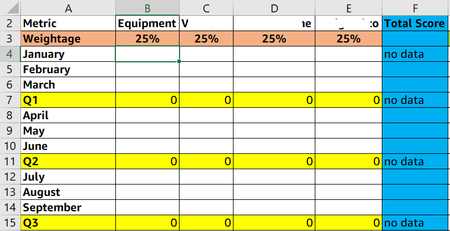
 Aug 18, 2022Please modify with simple formula like,
=IF(B2="JULY",IFS(G2>=80,5,G2>=70,4,G2>=60,3,G2>=50,2,G2<50,1,TRUE,"No Data"))
Incase of percentage you can add percentage symbol or 0.XX Decimal in the formula.
Greater than and equal to 80% is 5 and Less than 50 is 1,
Please do remember inverted commas "" is applicable only to text not number.

Harun24HR
Aug 17, 2022Silver Contributor
gretacristina You can try XLOOKUP() function. See the attached file.
=IF('Dashboard Needs'!B2="July",XLOOKUP('Dashboard Needs'!G2,{0.8,0.7,0.6,0.5,0.1},{5,4,3,2,1},"no data",-1),FALSE)

gretacristina
Aug 17, 2022Copper Contributor
Hi Harun24HR, thank you so much for your reply. I copied the formula to my Excel file and for some reason I get the #NAME? error. It happens the same when I'm changing the percentage in the file you sent me.
- Harun24HRAug 17, 2022Silver ContributorCan you check your excel version? XLOOKUP() only exist on Microsoft-365.
- gretacristinaAug 18, 2022Copper ContributorThat's probably why it would not work. Thank you for the help!