Forum Discussion

If And Formula
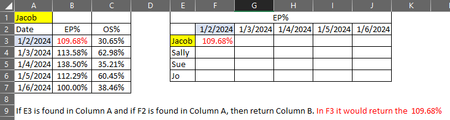

I'm going to guess that each person has a table below their name and each table has those same dates so it isn't IF you find that name it is more about finding a date in a table that is directly under that name. That said I would recommend inserting a column to the left or right of the table with a simple formula like the following assuming you insert the column at A and this goes into (the new) A2 and you fill down
=IF(L7="Date", L6, K6)(remember after you insert a column to the left of the table the name and Dates will be in column B)
now you could use a pivot table to create that table or various lookup techniques like:
=FILTER($M:$M, ($K:$K=$R2)*($L:$L=S$1), "")or
=SUMIFS($M:$M, $K:$K, $F3, $L:$L, G$2)You can also do this all in a single formula like:
=LET(in,K6:L26,people,Q2:Q4,Dates,R1:S1,
name,SCAN("",SEQUENCE(ROWS(in)),LAMBDA(p,q,IF(INDEX(in,q,1)="Date",INDEX(in,q-1,1),p))),
MAKEARRAY(ROWS(people),COLUMNS(Dates),LAMBDA(r,c,FILTER(TAKE(in,,-1),(name=INDEX(people,r))*(TAKE(in,,1)=INDEX(Dates,c)),""))))
EDIT: I editted the above formula based on the file you attached and updated the file (see attached). In the attached the 1st sheet I inserted the extra column and on the second sheet I used the LAMBDA function to do it all.