Forum Discussion

IF AND Formula help
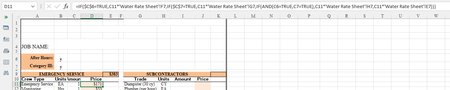

In your screenshot, C6 and C7 are empty.
Apart from that, you should test for both B6 and B7 being "y" before the individual tests.
Or:
=C11*IF($B$6="y", IF($B$7="y", 'Water Rate Sheet'!H7, 'Water Rate Sheet'!F7), IF($B$7="y", 'Water Rate Sheet'!G7, 'Water Rate Sheet'!E7))

Thank you for the suggestion!
Yes, they work individually but not when I combine them in the formula, so my syntax must be wrong and it's just not obvious to me what is the error:
=IF($B$6="y",C11*'Water Rate Sheet'!F7,
IF($B$7="y",C11*'Water Rate Sheet'!G7,
IF($B$6="y",IF($B$7="y",C11*'Water Rate Sheet'!H7,
C11*'Water Rate Sheet'!E7))))
- HansVogelaarAug 02, 2022MVP
The problem with your formula is that if B6 equals "y", the first condition is true, so the formula returns C11*'Water Rate Sheet'!F7 and ignores the rest, so the part IF($B$6="y",IF($B$7="y" is not evaluated.
The formula that I posted takes care of that. (Please note that it is a single formula)
- alp9423Aug 02, 2022Copper ContributorHansVogelaar
Brilliant!! It works just like you said. I was definitely over complicating things.
100 Thank You's! 🙂