Forum Discussion

I really need a help with finding & matching data from two different sheets.
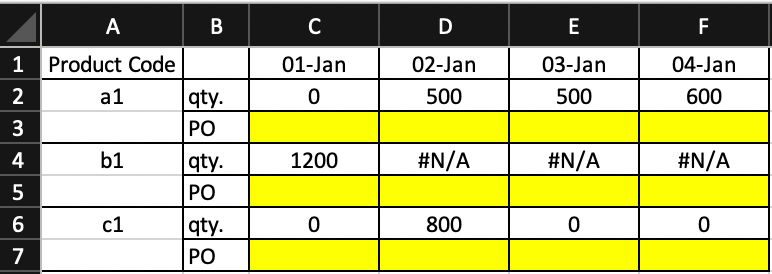
- Nov 18, 2020
here you go - the issue was the Countif reference, it should have been the qty figure rather than the product code

adversi Thank you for the explanation.
Is there any way that I can make a connection between PO and date? or Qty and date?
What I tried was to link qty. to date on the sheet that has qty. and date, and then tried to make a connection again with that cell to PO. In this way, I thought it would flexibly change even the qty changes or in any modification.
What you suggested works great, but if there is an adjustment made in one sheet, PO also changes or it shows the wrong PO. For example, C3 and C5 shared the same qty let's say 500, but a total qty of C3 got split into 200 and 300 but shares the same PO#. C3 has two same PO and C5 has a different PO. The problem is that the PO sheet does not get an update. Therefore the PO for C5 shifts to C3 (qty 300). If I modify PO data, PO# applies to the correct cell, but it takes time to adjust PO data every time when there is a change.
Please advise if there is any way that I can make a connection between qty and date.

The solution will vary based on how the data architecture is set up. For example, if Tab 2 and Tab 3 were downloaded tables or manually created. This is how the tabs are currently connected:
My main question is: Did you create Tab 2 or was it provided?
I would see the end goal to have a table like Tab 3 but with one more column of data to make it easier to work with and complete the connection. This will eliminate the duplicate Tab 2 table and make any changes or updates to the data more manageable and reliable:
From there the formula will change to something much more simpler.