Forum Discussion

Clemence
Jan 27, 2025Copper Contributor
i need a bit of help on my sheet
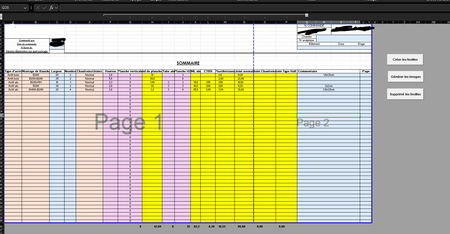
so there is this i worksheet i've been working on for a couples of weeks now and i was wondering if someone could help me. so the pink/yellow cells are going to be hidden and the orange/blue ar...

insightsgeek
Jan 28, 2025Brass Contributor
Hi HansVogelaar . I tried a few things for you.
1) You can press alt+; as Clemence mentioned.
2) You could put those columns at the start of the table and hide them, allowng you to start selecting from the first unhidden column, leaving the hidden cells untouched.
3) You can protect those cells in the desired columns, with Ctrl+1 => Dormat Cells and then protect the sheet.
4) If you are on desktop, you could use some VBA to achieve what you want in the Worksheet by saving the values in another temporarily sheet and pasting them back or using arrays.
I hope that helps a bit!