Forum Discussion

How XLOOKUP arguments apply in this case
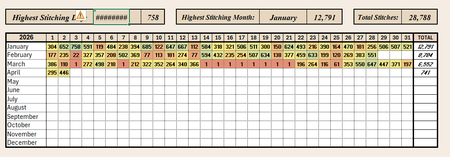

so you are correct this is backwards from the typical usage. However here is one option:
=XLOOKUP(J1,BYROW(B4:AF7,MAX),A4:A7)&" "&XLOOKUP(J1,BYCOL(B4:AF7,MAX),B3:AF3)or by naming the ranges it looks like this:
=XLOOKUP(maxCount,BYROW(data,MAX),months)&" "&XLOOKUP(maxCount,BYCOL(data,MAX),days)either way I used BYROW(...MAX) and BYCOL(...MAX) to find the max value in each row/column so I could then use the xlookup accordingly (i.e. 1 row to output from a row or 1 column to output from a column)
there is a problem with this solution in that if you have a tie it will take the first column (day) it finds and the first row (month) it finds which may not be one of the real max day results (e.g. if April 1 also has 758 then the output will be Jan 1 instead of Jan 3). So a solution that will correctly output all the max days could be:
=TEXTJOIN(", ",1,MAKEARRAY(12,31,LAMBDA(m,d,IF(INDEX(data,m,d)=maxCount,INDEX(months,m)&" "&d,""))))so in this case I make an array that is 12 rows by 31 days (size of the data) and look at the corresponding day and if it matches the maxCount then return the Month Day and then join all those values.
alternatively you can also do it this way:
=TEXTJOIN(", ",1,TRIM(IF(data=maxCount,months,"")&" "&IF(data=maxCount,days,"")))in this case I just act on the whole data table to apply the month and then again to apply the days and then textjoin again