Forum Discussion

How to unlink cells in Format Control
- Feb 09, 2026
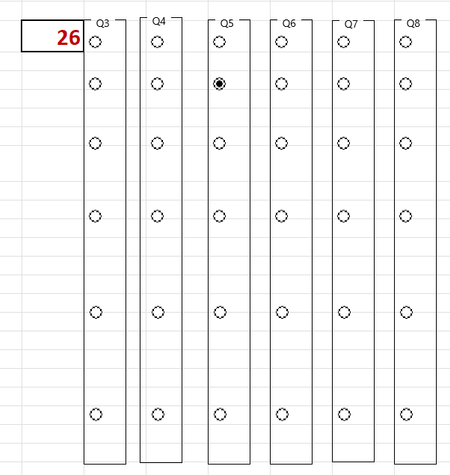
OK so I think I reproduced the problem. When I created 1 group box and then added all the select buttons into that box then after they were all created I moved them out of the box (or to a new box) they stayed linked to the original set. If I then removed the group box and added a new group box, it appeared to fix the issue but I did have to assign the referrence cell again.
The easiest way I found to delete or remove is to right click the name of the box then click somewhere else to get rid of the context menu then click Delete.
Hope that helps


Based on your description, you’re using Excel Form Controls (Option Buttons) inside Group Boxes to create survey questions, but when you copy-pasted them, all option buttons across different groups ended up linked to the same cell. Is exactly what happens when copied Form option buttons all keep the original Cell link reference.
When you copy a Group Box (Frame) with Option Buttons in Excel, all copied groups remain linked to the same cell by default. This causes all option buttons across questions to write to a single cell (e.g., selecting Q5’s 2nd button overwrites Q1’s value).
Here’s how you can try to fix it:
You do not need to recreate groups from scratch. Instead, adjust the linked cell for each copied group:
Step-by-Step…
1. Select the Group Box (the frame itself, not the buttons inside it):
- Click the border of the group box (the gray frame around the buttons) to select it.
2. Open Format Control Settings:
- Right-click the group box → Format Control.
3. Change the Linked Cell:
- In the Control tab, find the "Cell link" field.
- Replace the current cell reference (e.g., $B$2) with a new unique cell for that question (e.g., $B$3 for Q2, $B$4 for Q3, etc.).
.
- Critical: Use a different cell for each question (e.g., B2 for Q1, B3 for Q2, B4 for Q3, etc.).
When you copy a group box, Excel copies the linked cell reference but does not auto-update it.
Each group box (frame) should contain only its own 6 option buttons. If buttons from other groups are accidentally inside a single frame, they’ll act as one group.
Each group’s buttons start at 1 (e.g., Q1’s 1st button = 1, Q2’s 1st button = 1). Since they link to different cells, this is safe.
Excel automatically handles mutual exclusivity within a single group box. Just ensure each group has its own linked cell.
Do not set the linked cell for individual option buttons (this is handled at the group box level).
Do not copy/paste without updating the linked cell—this is the root cause of your issue.
Use a Consistent Cell Pattern
- Link all question responses to a single column (e.g., B2:B100), where:
- B2 = Q1’s answer
- B3 = Q2’s answer
- B4 = Q3’s answer
This makes data analysis (e.g., COUNTIF, SUM) much easier later.
This method saves time (no recreating groups) and ensures clean, error-free data collection.
My answers are voluntary and without guarantee!
Hope this will help you.
Was the answer useful? Mark as best response and like it!
This will help all forum participants.

Thank you Niko - this is clear and exactly what I had tried to do originally - unfortunately when I update the linked cell in one group box, it changes the linked cell for all the other group boxes... so for some reason they are not uncoupling