Forum Discussion

ChrisTheWizard
Aug 13, 2024Tin Contributor
How to sumif for multiple criteria in a single column?
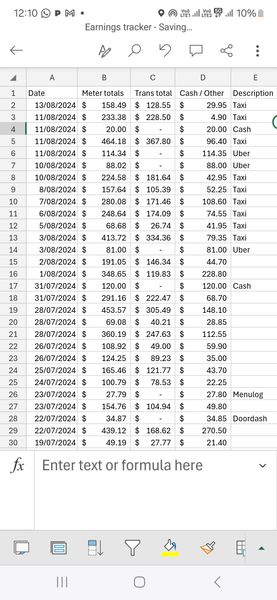
As an example. I want to sum everything in D column for this financial year with the Description of "Taxi" and "Cash" =SUMIFS(Data!D:D,Data!A:A,">="& DATE(YEAR(TODAY()),7,1),Data!A:A...
- Aug 14, 2024
ChrisTheWizard The screenshot suggests that you are on using the mobile version of Excel. Then the attached example, created on the desktop, should work for you as well.
No doubt, other will contribute alternative solutions.


JKPieterse
Aug 14, 2024Silver Contributor
ChrisTheWizard The SUMIFS function restricts you to AND logic of the criteria. To use OR, you can switch to using the SUM function. Here is a simplified example summing column A only if column E equals Cash OR Taxi.
=SUM(Data!A:A*((Data!E:E="Cash")+(Data!E:E="Taxi")))

ChrisTheWizard
Aug 14, 2024Tin Contributor
Not quite
Trying to sum D but
=SUM(Data!D:D*((Data!E:E="Cash")+(Data!E:E="Taxi")))
returns #value.