Forum Discussion

how to sum different number within dates range ?
- Mar 03, 2022
nalnofal Many of the dates in the Total Sales table are in fact texts that look like dates. That's why they do not meet the criteria set in the SUMIFS formula. You can check that using the ISNUMBER function. change the text dates to real dates an it will work.
Select all dates. On the Data ribbon select Text to columns and just press Finish without changing any of the settings. Done that in the attached file.


 nalnofalMar 03, 2022Copper Contributor
Let me explain to you what i really want .
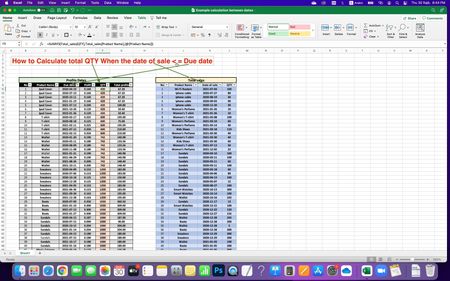
I use SUMIFS Formula to calculate total QTY from Due Date until today date :
=SUMIFS(Total_sales[QTY],Total_sales[Product Name],[@[Product Name]],Total_sales[Date of sale],"<="&[@[Due date]],Total_sales[Date of sale],"<="&$F$4)But as you see I can’t get exact Total QTY
for example I want to find total QTY for Ipad cover if Date of sale <= Due Date
i hope you understand my idea
- Riny_van_EekelenMar 03, 2022Platinum Contributor
nalnofal Many of the dates in the Total Sales table are in fact texts that look like dates. That's why they do not meet the criteria set in the SUMIFS formula. You can check that using the ISNUMBER function. change the text dates to real dates an it will work.
Select all dates. On the Data ribbon select Text to columns and just press Finish without changing any of the settings. Done that in the attached file.
- nalnofalMar 05, 2022Copper Contributor
Thank you very much Riny_van_Eekelen
your solution is very helpful , i review my original Data and i find many dates value is text even i change the format to dates .
So that the issue not in my formula and all my calculation was perfect.
I will keep in mind to use ISNUMBER function for all my dates value.