Forum Discussion

How to subtract from the same user
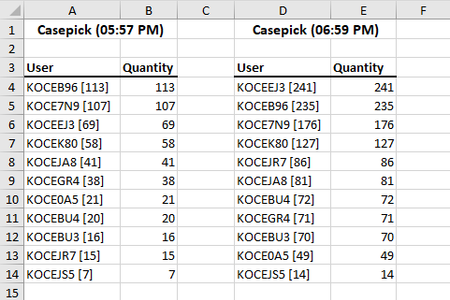

Let me correct what I wrote last night, but still with a caveat. It occurred to me overnight that there are lookup tools that allow for something other than an exact match, so it IS possible to lookup KOCEB96, leaving off the number in brackets at the end of the user ID.
HOWEVER, in order for that approximate match (which IS what it is) to work, the table(s) in which the search is being conducted needs to be sorted in alphanumeric order. If you sort the tables, then you can reliably search just by the first seven characters of the user IDs. It also turns out, however, that less than exact matches are problematic because Excel drops back one row after finding the closest match.
So in the attached spreadsheet I'm using a combination called INDEX and MATCH. MATCH finds a row number where the closest match to the first seven characters of the User ID are located, and then bounces back one; so I add 1 to that number and then use it in INDEX to return the value in the second column of your tables.
This is not beginner stuff. As I suggested in my earlier message, it would be cleaner, far cleaner, if the source of this data didn't blend the bracketed number in with the user ID. That muddies the water.
Here's a link where you can study up on the INDEX/MATCH combination