Forum Discussion

How to stop excel from updating dates.
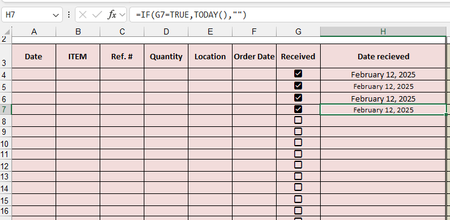

unfortunately have a handful of people that is not the best with using Excel. the ( CTRL - ; ) i know very well, but others do not, even when i train them to use it. that is why i wanted to use the check boxes. the check boxes at least is a easy visual for some to scroll through and see what was received and what wasn't since items can take a while to come in.

An alternative would be to use VBA code. This would require users to allow macros. Would that be OK?
- Evoss87Feb 13, 2025Copper Contributor
macros are acceptable, but i am not well versed so i would need a step by step to replicate.
- HansVogelaarFeb 13, 2025MVP
Right-click the sheet tab.
Select 'View Code' from the context menu.
Copy the code listed below into the worksheet module.
Switch back to Excel.
Save the workbook as a macro-enabled workbook (*.xlsm).
Private Sub Worksheet_Change(ByVal Target As Range) Dim rng As Range Dim cel As Range Set rng = Intersect(Range("G2:G" & Rows.Count), Target) If Not rng Is Nothing Then Application.ScreenUpdating = False Application.EnableEvents = False For Each cel In rng If cel.Value = False Then cel.Offset(0, 1).ClearContents Else cel.Offset(0, 1).Value = Date End If Next cel Application.EnableEvents = True Application.ScreenUpdating = True End If End Sub- Evoss87Feb 14, 2025Copper Contributor
Thank you, now how can i do that in multiple columns for different vendors?
IE: column G, O, W, AE, AM, AU,BC,BK, BS,CA are all check boxes. then H, P, X, AF, AN, AT, BL, BT, and CB are all dates.