Forum Discussion

How to stop excel from updating dates.
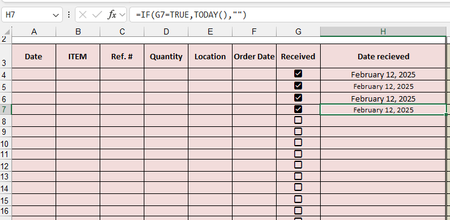

So your formula uses TODAY() so it will constantly update as long as the checkbox is true.
you could use a circular reference to prevent updates but would have to change the Excel options to allow circular references (e.g. set iterations = 1) then
=IF( G7 * (H7=""), TODAY(), H7)
BUT instead I would recommend just get rid of the checkboxes and just use the Date recieved and if there is a date there then it is recieved and if not then it is not. And add the shortcut to let others know how to easily enter that date (CTRL-;) so something like:
Date Recieved
( CTRL - ; )
and if you don't know, you can use ALT-ENTER to create that line feed inside that cell
Then it is nearly as easy to enter the date as it is to click the box and you don't have to worry about circular references and I would claim less likely to error by people accidentally clicking the wrong box and then no knowing how to or forgetting to undo that and hence having the wrong date listed.

unfortunately have a handful of people that is not the best with using Excel. the ( CTRL - ; ) i know very well, but others do not, even when i train them to use it. that is why i wanted to use the check boxes. the check boxes at least is a easy visual for some to scroll through and see what was received and what wasn't since items can take a while to come in.
- HansVogelaarFeb 13, 2025MVP
An alternative would be to use VBA code. This would require users to allow macros. Would that be OK?
- Evoss87Feb 13, 2025Copper Contributor
macros are acceptable, but i am not well versed so i would need a step by step to replicate.
- HansVogelaarFeb 13, 2025MVP
Right-click the sheet tab.
Select 'View Code' from the context menu.
Copy the code listed below into the worksheet module.
Switch back to Excel.
Save the workbook as a macro-enabled workbook (*.xlsm).
Private Sub Worksheet_Change(ByVal Target As Range)
    Dim rng As Range
    Dim cel As Range
    Set rng = Intersect(Range("G2:G" & Rows.Count), Target)
    If Not rng Is Nothing Then
        Application.ScreenUpdating = False
        Application.EnableEvents = False
        For Each cel In rng
            If cel.Value = False Then
                cel.Offset(0, 1).ClearContents
            Else
                cel.Offset(0, 1).Value = Date
            End If
        Next cel
        Application.EnableEvents = True
        Application.ScreenUpdating = True
    End If
End Sub
