Forum Discussion

RanzieJ
Sep 18, 2023Copper Contributor
How to split table?
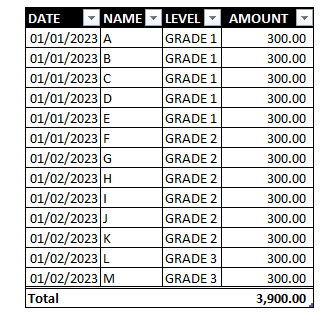
Hi , can i ask for help? is there a way or formula that can split tables with filter? Like this for example? From this : To This : Or if possible, separate them by "LEVEL" into separat...

PeterBartholomew1
Sep 19, 2023Silver Contributor
Separate sheets might be easier because each sheet has a different formula and, also, one partial table cannot overlap the next. The problem is that, in order to use recent methods, 2019 has to be removed in favour of using 365. Then, the formula
= DROP(
    REDUCE({"",""}, UNIQUE(Level),
      LAMBDA(acc,grd,
        LET(
          headerRow, {"","","","";"Date","Name","Level","Amount"},
          selected,  FILTER(table, Level=grd),
          total,     SUM(TAKE(selected, ,-1)),
          totalRow,  HSTACK("Total","","", total),
          VSTACK(acc, headerRow, selected, totalRow)
        )
      )
    ),
  2)
will give
as a single output, with a bit of conditional formatting!
- John_MichaloudisSep 19, 2023Copper Contributor
RanzieJ You can certainly do this and get "nearly" what you are looking for by using the Show Report Filter trick.
For your example, drop the "level" field in the Report Filter after you have laid out your Pivot Table.
Here is how: https://www.myexcelonline.com/blog/show-report-filter-pages-in-an-excel-pivot-table/
Thanks,
John Michaloudis
Microsoft MVP
- PeterBartholomew1Sep 19, 2023Silver ContributorGood idea. It's easy to overlook such functionality!
