Forum Discussion

How To Sort Excel Slicer By Number
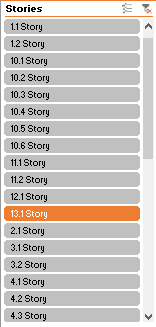

If that's structured table slicer you may change sorting order by adding custom list as here How To Customize The Order Of Your Excel Slicer Buttons — TheSpreadsheetGuru , don't think that's feasible in this case.
It that's PivotTable slicer you may add helper column in data model with stories numbers and sort stories by these numbers.
Otherwise it is sorted as source data will be sorted, i.e. as texts.

Can you explain a little bit more about it. Please explain. Thanks
- SergeiBaklanAug 28, 2021Diamond Contributor
Sorry, formula for storyNumber column is
=LEFT( Table1[Stories], FIND(" ", Table1[Stories]) -1 ) + 0didn't update screenshot in previous post.
- SergeiBaklanAug 28, 2021Diamond Contributor
First you need add data to data model, check this setting creating PivotTable
If add Stories to it now it'll be like
Open PowerPivot and add another column Story to the table
add storyNumber column, right click on it and Hide from Client Tools
Select Story column, Sort by Column and use stotyNumber
Hide Stories column.
Now you may use Story column and slicer on it
Please check in attached.