Forum Discussion

Renato3382
Apr 19, 2022Copper Contributor
How to return several values in an specific column?
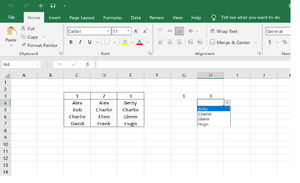
I am trying to find a formula that allows me to retrieve several specific cells located in a same column so those values can be part of a drop-down selection. In the example below, G4 and H4 have "t...

Renato3382
Apr 20, 2022Copper Contributor
Thank you OliverScheurich
However, I do not quite understand how the formula that you place on the data validation identifies only specific cells from the selected column. I can see how (let's say, on cell I4) the function INDIRECT locates the column3 but where in the formula says to only display the cells with names (E4 to E7) and not the cell with the number (E3)?
Thank you again.
PS: I understand if this takes too much of your time.
However, I do not quite understand how the formula that you place on the data validation identifies only specific cells from the selected column. I can see how (let's say, on cell I4) the function INDIRECT locates the column3 but where in the formula says to only display the cells with names (E4 to E7) and not the cell with the number (E3)?
Thank you again.
PS: I understand if this takes too much of your time.

OliverScheurich
Apr 20, 2022Gold Contributor
You can open the Name Manager with ctrl+F3 or if you select Formulas -> Name Manager. In the Name Manager you can see the values and the ranges to which the name refers to.