Forum Discussion

How to print out all item inside the drop down box (picture included)
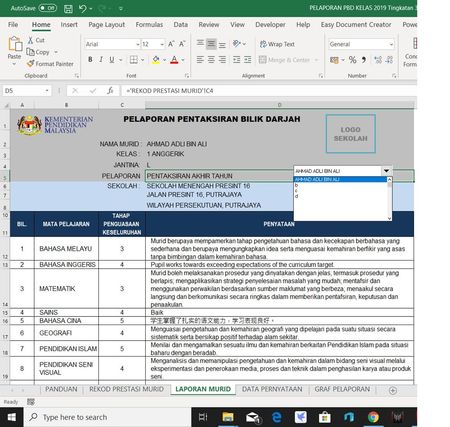
- Oct 31, 2019
wcdf00 YOu could use a macro like this to print all items in the list:
Sub PrintAll()
    Dim lCt As Long
    With ActiveSheet.DropDowns("Drop Down 4")
        For lCt = 1 To .ListCount
            .ListIndex = lCt
            If Len(.List(.Value)) > 0 Then
                ActiveSheet.PrintOut
            End If
        Next
    End With
End Sub

Hi, JKPieterse
I'm also a teacher and is using the same excel file for my class. Is there any macro for me to save the data from the dropdown menu to separate pdf files instead of printing them. I've tried using the macro with print to pdf but I have to manually rename and and hit save every time the save as dialogue box appear.
Thanks in advance.

amnaida That is simple enough. The code below takes the selected value in the dropdown and uses that as the filename of the pdf. Make sure you edit the code below so it contains the correct path where to save the pdf files:
Sub PrintAll()
    Dim lCt As Long
    With ActiveSheet.DropDowns("Drop Down 4")
        For lCt = 1 To .ListCount
            .ListIndex = lCt
            If Len(.List(.Value)) > 0 Then
                ActiveSheet.ExportAsFixedFormat Type:=xlTypePDF, Filename:= _
                                                "C:\ChangePathHere\" & .List(.Value) & ".pdf", Quality:=xlQualityStandard, _
                                                IncludeDocProperties:=True, IgnorePrintAreas:=False, OpenAfterPublish:= _
                                                False
            End If
        Next
    End With
End Sub
 Soggy4040Oct 09, 2022Copper Contributor
I'm trying to use this for a drop down list that is specifically in cell A2 (dropdown list is taken from a list on a seperate sheet and calle "=Overview!$B$4:$B$38". I also want the pdfs collated as one file on the computer desktop. Any help really appreciated.......not a regular code user. Thank you JKPieterse
- JKPieterseOct 10, 2022Silver Contributor
Soggy4040 Assuming this macro is called from a button on the sheet containing that drop-down and assuming that we can write the value from the list in the overview sheet into cell A2 of the active sheet:
Sub PrintAll()
    Dim rng As Range
        For Each rng In Worksheets("Overview").Range("B4:B38")
            If Len(rng.Value) > 0 Then
                ActiveSheet.Range("A2").Value = rng.Value
                ActiveSheet.ExportAsFixedFormat Type:=xlTypePDF, Filename:= _
                                                "C:\ChangePathHere\" & rng.Value & ".pdf", Quality:=xlQualityStandard, _
                                                IncludeDocProperties:=True, IgnorePrintAreas:=False, OpenAfterPublish:= _
                                                False
            End If
        Next
End Sub
To merge multiple pdfs into one you need special software, I suggest to google for that.
- Soggy4040Oct 15, 2022Copper ContributorThank you for your help, but I don't really have access to specialised software to merge pdf's so I think it is easier to go for straight printed copies.
I tried this but found when I ran the macro, it printed multiple copies of the same person in the dropdown (1st name). It did however print the exact number of copies related to how many names there were in the dropdown. Any help gratefully received. Kind regards
Sub PrintOutAllDepots()
Dim r As Range
Set r = Sheets("Overview").Range("B4:B48")
Dim i As Integer
i = 1
Sheets("Analysis").Activate
For Each c In r
Range("R1").Value = r(1, i).Value
ActiveWindow.SelectedSheets.PrintOut Copies:=1
i = i + 1
Next c
End Sub
 engghomAug 26, 2022Copper Contributor
JKPieterse hi sir, I am unable to run this code in my sheet and found error of 400 and 1004.
- JKPieterseAug 27, 2022Silver ContributorFor this code to work you need a particular setup, please read the original post carefully
 ikhwanizyanAug 28, 2022Copper Contributor
hello there, im also the same line as them, but can you show me how to use the code? a bit at lost here at the moment as i need to print the same file as them
 atiqahsahidah1989Aug 01, 2021Copper ContributorHi, thanks for your help. But i still have a little problem which is, the saved pdf file stops at drop down number 25. So is there anything i can do to change this? I have up to 38 students in my class. Thank u again 🙏🏼
- JKPieterseAug 04, 2021Silver Contributor
atiqahsahidah1989 Anything special about item number 25? Do you get an error?
 Jjampo26May 28, 2022Copper ContributorHi JKPieterse
I got the same profession mentioned above and relatively same problem since now I know how to automatically print all documents from their respective drop-down list in one click. What I want to do next is print the documents back to back (sheet1 print to front and sheet2 to print to back page of the paper) since my printer is capable of printing automatically on 2-side of the paper.
*Note I am using the vlookup formula on both sheet1 and sheet2.
Is their anyway this could be possible?
- morristyoJul 28, 2021Copper Contributor
JKPieterse
Sorry sir i cant use ur code. I had debug at With ActiveSheet.DropDowns("Drop Down 4"). Can u help me ? Thx- JKPieterseJul 29, 2021Silver Contributor
morristyo This code assumes you have a drop-down (forms control, not activeX control!) on your sheet which is named "Drop down 4".
- morristyoAug 01, 2021Copper ContributorTenkeu very much sir. Ur are very very help me. Thx
- amnaidaJul 13, 2021Copper ContributorWorks like magic! thanks a gazillion! You've just made my day 😃