Forum Discussion

SGeorgie
Sep 26, 2022Brass Contributor
How to not display 1900 in the filter when i have used conditional formatting to not display date
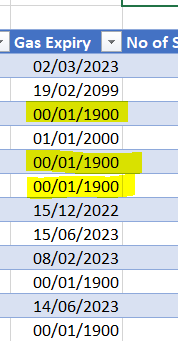
Hi I have blank dates that show as 00/01/1900. I have used conditional formatting (custom ;;;) to show them as blanks. But when I use the filter they still show as 1900 ...
 Sep 26, 2022
It's a refreshable so replacing not really an option but I'll check if these a formula. I think there's =(original date column)+1-1

HansVogelaar
Sep 26, 2022MVP
The values 00/01/1900 aren't real blanks, but zeros.
Does the Gas Expiry column contain formulas? If so, change the formulas to return "" instead of 0.
Otherwise, select the column and replace 00/01/1900 with nothing (blank).
SGeorgie
Sep 26, 2022Brass Contributor
It's a refreshable so replacing not really an option but I'll check if these a formula. I think there's =(original date column)+1-1
- HansVogelaarSep 26, 2022MVP
- SGeorgieSep 27, 2022Brass ContributorBrilliant, that worked, thank you
- SGeorgieSep 26, 2022Brass ContributorSo would this make an us date appear in UK format too
- HansVogelaarSep 26, 2022MVP
That has nothing to do with it.