Forum Discussion

How to move a sum to another cell?

Hello,
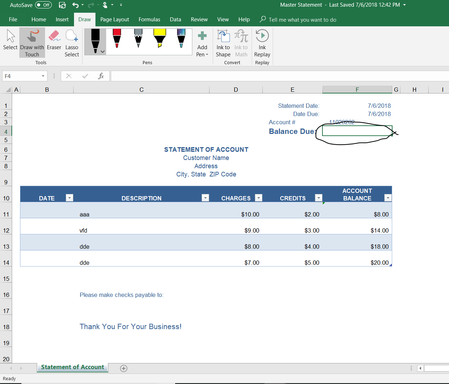
I'm not sure that Matt's approach will give you the correct answer. The screenshot shows a statement where the Balance column shows the actual balance in the last populated row, taking into account the previous row's balance, adding the charges and subtracting the credits.
Summing all values in the Balance column will give you the wrong result. In your screenshot, the "Balance Due" should be 20, and not the sum of all numbers in the column.
A formula to show the last value of the Balance column could be something like this:
=INDEX(Table1[ACCOUNT BALANCE],MATCH(99^99,Table1[ACCOUNT BALANCE],1))
If the name of your table is not Table1, please adjust it in the formula. This formula will always use all rows in the table, so you don't need address more rows that you currently have.

Hey Ingeborg-
Thank you for catching that issue. I didn't notice that at first glance. Here is another formula that will also work in this scenario:
=LOOKUP(2,1/(Table1[Account Balance]<>""),Table1[Account Balance])
- Jul 11, 2018
Hey Matt Mickle,
no worries. Great that Gene Ciaudella now has two working formulas to choose from.
cheers, Ingeborg