Forum Discussion

How to make a list from an excel spreadsheet with many columns
- Jan 03, 2023
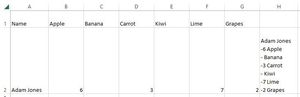
You need a different kind of formula in Excel 2016. TEXTJOIN is not available there. Try this:
=A2&IF(B2="","",CHAR(10)&"- "&B2&" "&B$1)&IF(C2="","",CHAR(10)&"- "&C2&" "&C$1)&IF(D2="","",CHAR(10)&"- "&D2&" "&D$1)&IF(E2="","",CHAR(10)&"- "&E2&" "&E$1)&IF(F2="","",CHAR(10)&"- "&F2&" "&F$1)&IF(G2="","",CHAR(10)&"- "&G2&" "&G$1)


Depends on your Excel version, perhaps you shall use it as array formula.

- HansVogelaarJan 03, 2023MVP
You need a different kind of formula in Excel 2016. TEXTJOIN is not available there. Try this:
=A2&IF(B2="","",CHAR(10)&"- "&B2&" "&B$1)&IF(C2="","",CHAR(10)&"- "&C2&" "&C$1)&IF(D2="","",CHAR(10)&"- "&D2&" "&D$1)&IF(E2="","",CHAR(10)&"- "&E2&" "&E$1)&IF(F2="","",CHAR(10)&"- "&F2&" "&F$1)&IF(G2="","",CHAR(10)&"- "&G2&" "&G$1)
- SergeiBaklanJan 03, 2023Diamond Contributor
- JStroyerJan 03, 2023Copper ContributorThanks very much, that works great!! Really appreciate your help! 🙂
- SergeiBaklanJan 03, 2023Diamond Contributor
I practically don't remember 2016. Try to enter the formula with Ctrl+Shift+Enter instead of Enter.
- JStroyerJan 03, 2023Copper ContributorThanks! It didn't work on my Excel but i tried it on Google Sheets and it worked there! I couldn't get it to work there before either so this must be the fix! That is awesome, thank you so much!!
My next question...my list will be longer, and I need it to keep grabbing the top row (product names) along with the qty. Is there a way to have it continue taking the name along with the qty from say 6B, 6C, etc?- SergeiBaklanJan 03, 2023Diamond Contributor
If compare with Google Sheets when Excel 365. Both have pros and cons, depends on scenario to use. But Excel 2016 is outdated version.
As for the second part I didn't catch. Do you mean same name could be in different rows or what? I appreciate if you could illustrate on the sample.