Forum Discussion

How to make a function to generate genetic code table?
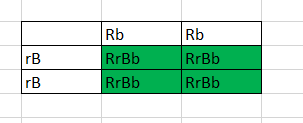
- May 15, 2020
@ChocolateTibi BTW, if the other person's prior solution works for you great, but my excel doesn't like SORT or SEQUENCE. Also, just for fun I thought of another way. This way is a little more 'generic' in that it doesn't explicitly require "R" first and "B" second but still requires first and second char different:
=CHAR(MIN(CODE($A7),CODE(B$6)))&CHAR(MAX(CODE($A7),CODE(B$6)))&CHAR(MIN(CODE(RIGHT($A7,1)),CODE(RIGHT(B$6,1))))&CHAR(MAX(CODE(RIGHT($A7,1)),CODE(RIGHT(B$6,1))))
if you want to combine things like "RR" & "rr" to get "RRrr" the above would have to get expanded to use LARGE and include all 4 characters in each case.


Clearly this is no use to anyone at present but it may still be of some interest in the longer term. The LET function allows a sequence of local names to be generated and used within the formula
= LET(
joined, @string1&@string2,
split, MID(joined, {1,2,3,4}, 1),
case, BITAND(CODE(split),32)>0,
sorted, SORTBY(split, split,-1, case,1),
CONCAT(sorted) )
joined forms a 4 character string from the row header and the column header
split is the same 4 characters as an array
case is a Boolean, TRUE for lower case (works by testing a specific bit in the ASCII code)
sorted uses reverse alphabetic order, followed by sorting by case.
Much of this can be done in traditional Excel by using defined names but clearly the SORTBY function is a new dynamic array function and the LET brings the definition of names out of Name Manager.